
Local SEO in 2026 comes down to five things. A verified Google Business Profile. The same name, address and phone everywhere. Fresh reviews you reply to. Listings on Apple Maps and Bing. And a website with a real page for each place you serve.
Do those well and you have covered most of what Google says it uses: relevance, distance and prominence. You cannot pay Google for a better local position. Google's own help page is blunt about it.
The bar is low. BrightLocal's SMB research, cited in its 2026 consumer survey, puts the share of small businesses with a Google Business Profile at just 35%. This local SEO checklist gets you ahead of the other 65%.
Why this local SEO checklist works: how ranking is decided
Google names three factors for local results.
- Relevance: how well your profile matches the search. Complete, specific details help.
- Distance: how far you are from the person searching. You can't change this, apart from being honest about your service area.
- Prominence: how well known you are. Google says links to your site and your number of reviews and ratings feed into it.
Everything below pushes on relevance or prominence. Nothing pushes on distance, so ignore anyone who promises to "rank you across the whole city" from one address.
1. Google Business Profile: claim, verify, complete
This is the single biggest lever. Start at business.google.com/add, or find your business on Google Maps and choose "Claim this business".
How to get on Google Maps as a business:
- Check you're eligible. You need a place customers visit during stated hours, or you travel to them.
- Add or claim the profile and pick a verification method.
- Use your real-world name. No taglines, city names or keywords bolted on.
- Choose the most specific primary category, and as few extras as you need.
- Add hours, including special hours for holidays.
- Service-area business working from home? Hide the street address and set the areas you cover.
- Add photos, services or products, and attributes such as parking or accessibility.
- Keep one profile per location. Duplicates confuse Maps.
Google is clear that only verified businesses show their information on Maps and Search.
Google Business Profile not showing up on Maps?
Work through these in order.
| Symptom | Likely cause | Fix |
|---|---|---|
| Can't find it at all | Not verified | Finish verification |
| Created recently | New profile | Google says rankings for new businesses can take up to a month |
| Old details still showing | Recent edit | Changes can take up to 3 days |
| Vanished overnight | Suspended or disabled | Check the account's email for a notice, fix, appeal |
| Shows for your name only | Weak relevance or prominence | Categories, reviews, website, citations |
| Two versions appear | Duplicate profile | Remove or merge the duplicate |
If your website is the problem rather than the map pin, see why your website isn't showing on Google.
2. Reviews: count, freshness and replies
Reviews are part of prominence, and they are what customers read before they call.
BrightLocal's 2026 survey of 1,002 US adults found 97% read reviews for local businesses. 47% won't use a business with fewer than 20 reviews. 74% only care about reviews from the last three months. 31% only use businesses rated 4.5 stars or higher. And 89% expect the owner to respond.
The checklist items:
- Get your review link and QR code from the profile.
- Ask every customer, soon after the visit, not just the happy ones.
- Reply to every review, in your own words.
- Never offer anything in return. Google removes incentivised reviews and can restrict your profile.
We cover the method and the rules in how to get more Google reviews.
3. Beyond Google: Apple Maps, Bing and the rest
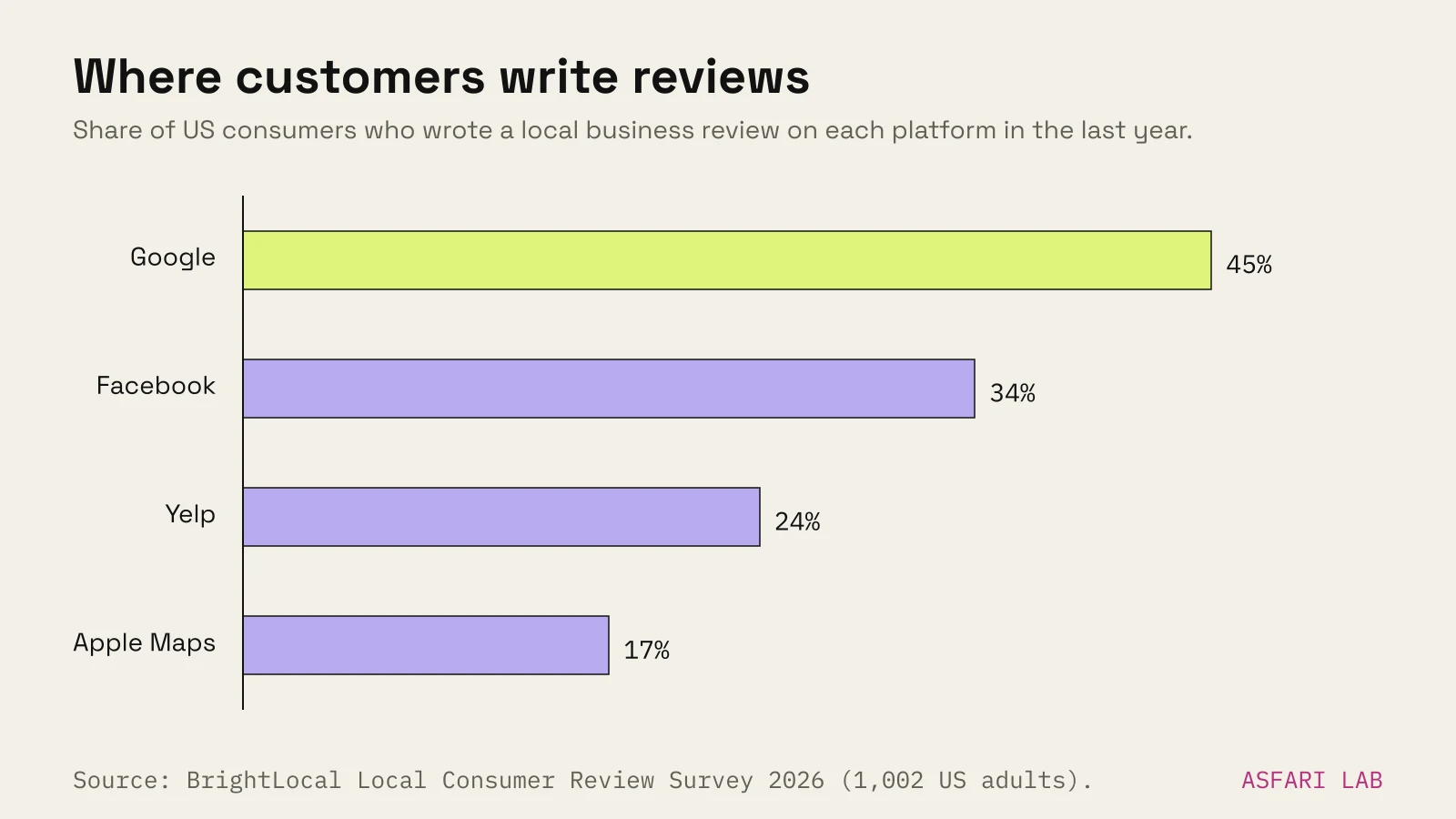
Google is still the main place people check. But it is losing share. In the same BrightLocal survey, Google use for reviews fell from 83% to 71% in a year. Apple Maps rose from 14% to 27%. AI tools such as ChatGPT jumped from 6% to 45%. The average consumer now uses six review sites.
| Platform | Where your listing shows | How to manage it | Cost |
|---|---|---|---|
| Google Business Profile | Google Search, Maps, AI Overviews | business.google.com | Free |
| Apple Business (was Business Connect) | Apple Maps, Wallet and other Apple apps | business.apple.com | Free |
| Bing Places | Bing search and Bing Maps | bing.com/forbusiness, can import from Google | Free |
| Facebook page | Meta Business Suite | Free | |
| Industry and local directories | The directory itself, plus search | Each site's own form | Often free |
Apple Maps. In April 2026 Apple folded Business Connect into a single free platform called Apple Business. Claim your location there to control your name, logo, hours, photos and key details on Maps. Apple Maps is the default maps app on every iPhone.
Bing Places. Microsoft moved the tool to bing.com/forbusiness in late 2025 and improved the import from Google. If your Google profile is in order, the import does most of the work. It matters more than Bing's market share suggests: ChatGPT search can send queries to third-party providers such as Bing. More on that in how to show up in ChatGPT.
4. Citations and NAP consistency
A citation is any mention of your business name, address and phone number (NAP) on another site. Directories, chamber listings, supplier pages, local press.
Search engines and AI tools compare these sources. When they agree, you look like one solid business. When they disagree, you look like three uncertain ones.
The checklist:
- Write down one canonical version of your name, address, phone, website and hours.
- Use it character for character on Google, Apple, Bing, Facebook and your website.
- Search your business name plus your old address or old phone number. Fix every hit you can.
- Add yourself to two or three directories that matter in your trade or city. Skip the hundred-site packages.
- When you move or change your number, update all of them in the same week.
5. Your website: local pages and schema
Your profile links to your website. Google uses the site to understand your categories and services, and links to it count towards prominence.
Local pages
- One page per location. Address, map, hours, phone, how to get there, parking.
- One page per main service if you serve several towns, written for real people. Swapping the town name into the same text is a doorway page, and Google treats those as spam.
- Phone number as a tap-to-call link. Opening hours as text, not an image.
- One clear action. On the Pistache pâtisserie site we made in the lab, that is a single "Order for pickup" button.
If you run a café, bakery or salon, our small business website checklist goes deeper on what the page needs.
LocalBusiness schema
Add LocalBusiness structured data in JSON-LD on your contact or location page. Google requires name and address. It recommends telephone, url, geo, openingHoursSpecification and priceRange, plus menu and servesCuisine for food businesses.
Two rules. Use the most specific type, such as Bakery or HairSalon. And make the markup match what's visible on the page. Google doesn't guarantee any rich result from it, but it removes guesswork. We set up schema, Search Console and IndexNow on asfari.digital itself in October 2026.
6. Measure what changes
Pick three numbers and check them monthly.
- Profile actions: calls, direction requests and website clicks in your Business Profile performance view.
- Search Console: clicks and queries for your location pages.
- Real enquiries: ask new customers how they found you, and write it down.
If those three rise, your local SEO is working. If only impressions rise, it isn't yet. For how long this usually takes, see how long does SEO take.