If your website is not showing on Google, it's usually one of two problems. Either Google hasn't indexed it, or it's indexed but ranks too low to find.
Indexing problems are the common ones on new sites. A password, a "hide from search" switch or a stray noindex tag. They take minutes to fix.
Ranking problems take longer. The site is in Google, but other pages answer the search better.
Work through the checks below in order. The first four take about ten minutes. Stop when you find the cause.
1. Run a site: search (1 minute)
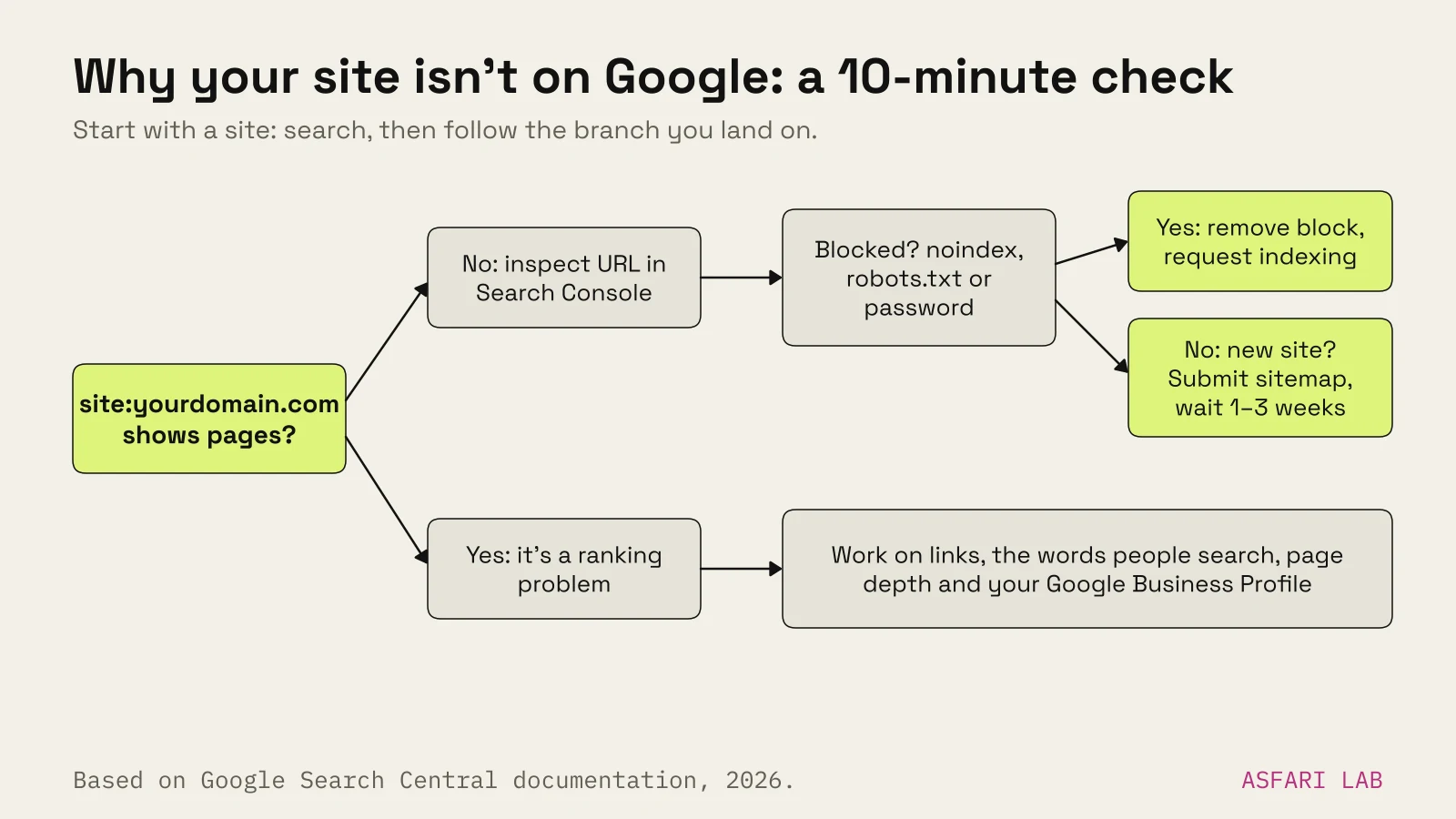
Go to Google and type site:yourdomain.com with your own address. No spaces after the colon.
- No results at all: Google hasn't indexed the site. Carry on to step 2.
- Some pages show: You're indexed, at least partly. Your problem is probably ranking. Skip to step 5.
- Old pages or a different site show: You may have a domain or redirect problem. Note it and carry on.
Treat this as a rough test only. Google's own docs say a site: search doesn't always list every indexed page. Search Console is the real answer.
2. Check Search Console (3 minutes)
Google Search Console is free. It shows exactly what Google knows about your site. If you haven't set it up, do it now. Verify with a DNS record so the whole domain is covered.
When we set up asfari.digital in October 2026, we added it as a domain property and submitted the sitemap. Search Console discovered 54 pages from it.
Then look at two things.
URL Inspection
Paste your homepage address into the bar at the top. It tells you whether the page is on Google, and if not, why.
If it says the page isn't indexed and nothing is blocking it, click Request indexing. Google says crawling can take from a few days to a few weeks. Asking again doesn't speed it up.
Pages report
Open Indexing → Pages. It lists every URL Google knows about and why some aren't indexed. The common reasons:
| Reason shown | What it means | What to do |
|---|---|---|
| URL marked 'noindex' | A tag tells Google to stay out | Remove it (step 3) |
| Blocked by robots.txt | Google isn't allowed to crawl | Fix robots.txt (step 3) |
| Discovered – currently not indexed | Google knows the URL but hasn't crawled it yet | Wait, add internal links |
| Crawled – currently not indexed | Google looked and chose not to index, for now | Improve the page, avoid thin duplicates |
| Duplicate, Google chose different canonical | Google picked another URL as the main one | Check canonicals and duplicates |
| Page with redirect / Not found (404) | Old or broken URLs | Fine if intended; 301-redirect moved pages |
Don't panic at a long list. Google says not every URL is meant to be indexed. What matters is that your important pages are.
3. Look for noindex, robots.txt and passwords (3 minutes)
This is the most common cause on new sites. A setting used while building the site was never switched off.
A noindex tag keeps a page out of results. A robots.txt block stops Google crawling at all. One trap: if robots.txt blocks a page, Google can't see its noindex tag either. Fix both.
Here's where to look on each platform.
Why is my website not showing up on Google on Squarespace?
Check Settings → Site Availability. If it says Private or Password Protected, Squarespace hides the site from search engines. Set it to Public.
Then check each important page: Page settings → SEO → Hide page from search results should be off. Also look in Code Injection for a stray noindex tag.
Why is my website not showing up on Google on Shopify?
New Shopify stores start in private mode, behind a password. Shopify says that in this mode your pages are hidden from visitors and search engines.
Go to Online Store, click the Private label, choose Public, then Launch store or Update. On a trial plan you may need to pick a plan or add a business address first.
Wix
Go to SEO & GEO → Tools and settings → SEO Settings. Turn on Let search engines index your site. Wix says free and paid sites can both be indexed.
WordPress
Go to Settings → Reading. Untick Discourage search engines from indexing this site. That box adds a site-wide noindex tag. It's often left on after launch.
Custom-built sites
Ask your developer to check three things. Robots.txt for Disallow: /. The page head for noindex. The server headers for X-Robots-Tag. Staging settings get copied to live more often than anyone admits.
4. Is the site just new? (1 minute)
If everything above is clean and the site launched recently, it may simply be early.
Google says it takes time to crawl a new page, and more time to index it. That can be a day or two, or a few weeks. After submitting a sitemap or an indexing request, give it at least a week before assuming there's a problem.
To help it along:
- Submit your sitemap in Search Console under Indexing → Sitemaps.
- Request indexing for your homepage.
- Link to the new site from places you already control: your Google Business Profile, social profiles, a supplier's page.
You can also tell Bing and Yandex about new pages instantly with IndexNow. We set this up on asfari.digital. Google doesn't take part in IndexNow, so Search Console is still the route there.
If you're wondering how long ranking takes after that, see how long SEO takes for a new website.
5. Why is my website not ranking on Google?
If site: shows your pages but searches for your services don't, you're indexed but not ranking. That's a different job. Three causes cover most cases.
Nobody links to you
Google mainly finds and weighs pages through links from pages it already knows. A new site with zero links from other sites looks like a stranger.
Start with links you can earn honestly. Local directories, trade associations, suppliers, partners, a local news story. Don't buy links. Google's spam policies treat that as link spam.
Your pages use the wrong words
You call it "bespoke joinery". Your customers search "kitchen cabinets made to measure". Google matches what people type.
Check what people really search. Search Console's Performance report shows the queries you already appear for. Then make sure each service has its own page, with the customer's words in the title, the heading and the first paragraph.
The page is thin
One line per service isn't enough to beat a competitor with a full page. Add prices or price ranges, area served, photos of real work and answers to common questions.
6. Local business? Check your Google Business Profile
For searches like "florist near me", Google shows the map pack before normal results. Those spots come from Google Business Profile, not your website.
If you serve customers locally:
- Claim and verify your profile.
- Pick the most precise primary category.
- Add hours, area served, photos and your website link.
- Ask happy customers for reviews.
Google says local ranking depends on relevance, distance and prominence. Prominence includes reviews and links. You can't pay for a better local position. Our local SEO checklist goes step by step.
Website still not showing on Google? When to get help
Fix it yourself if you found a password, a toggle or a noindex tag. Those are five-minute fixes.
Get help if:
- Search Console shows hundreds of pages "Crawled – currently not indexed".
- Pages were indexed and then disappeared after a redesign or migration.
- You're indexed but invisible for every search that matters.
- You can't tell which of the above applies.
Start with our free website check. It's a recorded 15-minute walkthrough with your top three problems and three quick fixes. If the problem runs deeper, our technical SEO audit starts at €690. To see how that compares with other options, read how much SEO costs for a small business.