The way to get Google reviews is simple: ask every customer, at the right moment, with a direct link. Most people say yes. BrightLocal's 2026 survey found 78% of consumers were asked for a review in the past year, and 83% of those asked left one.
What doesn't work is anything clever. Discounts for reviews, asking only happy customers, staff quotas. Google bans all three. In the EU, fake or commissioned reviews are also illegal.
Here is how to get Google reviews for your business, step by step, and stay on the right side of both.
Why reviews matter more in 2026
Reviews used to be a nice extra. Now they are a filter people apply before they even look at you.
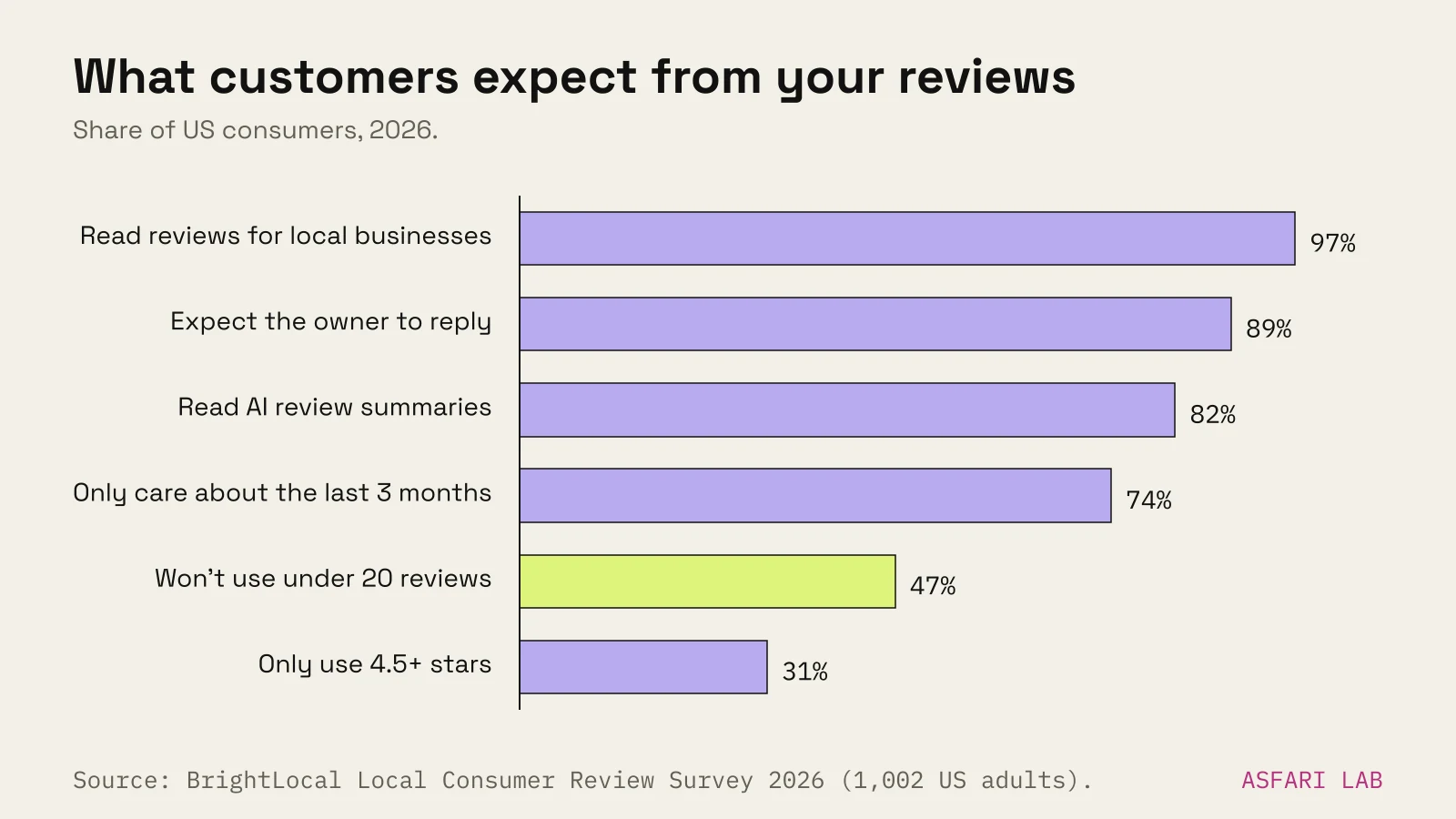
BrightLocal's Local Consumer Review Survey 2026 (1,002 US adults, published February 2026) found:
| What consumers do | Share |
|---|---|
| Read reviews for local businesses | 97% |
| Always read them (29% in 2025) | 41% |
| Won't use a business with fewer than 20 reviews | 47% |
| Only care about reviews from the last 3 months | 74% |
| Only use businesses rated 4.5 stars or more | 31% |
| Expect the owner to respond | 89% |
| Read AI-generated review summaries | 82% |
Two of those numbers should shape your plan. Twenty reviews is the bar. And they need to be recent, so this is a habit, not a one-off campaign.
Reviews also feed Google's local ranking. Google says the number of reviews and ratings counts towards "prominence". We cover the other ranking factors in the local SEO checklist.
Get your Google reviews link and QR code
You don't need a third-party tool. Google gives you both.
- Open business.google.com on a computer. Google says the review QR code can only be generated in a desktop browser, not on mobile.
- Select Read reviews, then Get more reviews.
- Click the copy icon to copy your Google reviews link.
- Right-click the QR code and choose Save image as to download it.
The link opens the review box for your profile directly. No searching, no "which branch is it?".
You must have a verified profile for this. If you don't, start with how to get on Google Maps.
Where to put the link and QR code
Google suggests receipts, thank-you emails, the end of a chat, and a printed QR code in your shop. We'd add:
- The confirmation or follow-up email after a booking or order.
- A short line in your WhatsApp or SMS after a job is done.
- The packaging insert for online orders.
- A small card at the till, or on the table with the bill.
- Your email signature, quietly.
How to get Google reviews with a QR code that people actually scan: make it big enough to scan from arm's length, put it where customers already pause, and add one short line such as "Tell us how it went." Keep the code out of the doorway, where nobody stops.
How to get Google reviews: when and how to ask
Timing does most of the work. Ask when the good experience is still fresh.
| Business type | Best moment to ask |
|---|---|
| Café, bakery, restaurant | At the bill, or a QR on the table |
| Salon, clinic, studio | Same-day message after the appointment |
| Trades and home services | Message on job completion, once the customer has seen the result |
| Online shop | Email a few days after delivery |
| Agency or consultant | After a milestone the client is happy with |
Write the ask in one breath
Short, personal and with the link. For example:
Thanks for coming in today. If you have a minute, a Google review helps a small shop like ours a lot: [link]
That's it. Don't tell people what to write, and don't ask them to mention a staff member by name. Google forbids requesting specific content.
Ask everyone
This is the rule most businesses break without knowing. Google's policy bans selectively asking only satisfied customers. Tools that first ask "Were you happy?" and only send the five-star crowd to Google are review gating. It's against the policy.
Ask everyone. A few honest three-star reviews make your rating look real. Google itself says a mix of positive and negative reviews often seems more trustworthy.
How to reply to Google reviews
Replying is part of getting more reviews. People who see you answer are more willing to write. And 89% expect you to.
BrightLocal also found 50% are put off by templated or generic replies. So write each one.
- Reply soon. BrightLocal found 32% expect a reply by the next day.
- Use their name and something specific from their review.
- Keep it short. Two or three sentences.
- Negative review? Thank them, acknowledge the problem, say what you've done or will do, and offer to continue by phone or email. Never argue in public. Never share their personal details.
- Don't advertise. Google discourages using replies for promotions.
- Sign off with your name or initials.
You must be verified to reply. Replies go through a quick policy check before they show, usually within minutes.
If a review breaks Google's policies, such as spam, hate speech or a competitor posing as a customer, flag it from your profile. Bad but genuine reviews stay.
What's forbidden: Google's rules and EU law
Google's policy
Google's contributed content policy for Maps forbids businesses from:
- Offering incentives for reviews. That includes payment, discounts and free goods or services. It also covers paying for a review to be changed or removed.
- Discouraging negative reviews or selectively soliciting positive ones.
- Asking staff to collect a set number of reviews.
- Requiring or pressuring customers to review while on your premises.
- Posting reviews about your own business, or having employees, family or partners do it. That's a conflict of interest.
- Buying reviews or posting from multiple accounts.
The penalties are real. Google removes the reviews. It can also block new reviews for a period, hide existing ones, and show a warning on your profile saying fake reviews were removed. That warning is far worse than a low rating.
"Leave a review and get 10% off" is the most common mistake. It is an incentive, even if you accept negative reviews too.
EU consumer law
In the EU, the Omnibus Directive (2019/2161) added fake reviews to the list of unfair commercial practices. Member States have applied it since 28 May 2022. Two practices are banned outright:
- Submitting false consumer reviews, or commissioning someone else to do it.
- Misrepresenting reviews, for example claiming they come from verified buyers when you don't check.
If you show reviews on your own website, you must also tell visitors whether and how you check that they come from real customers. For widespread cross-border breaches, the maximum fine must be at least 4% of annual turnover in the countries concerned, or at least €2 million where turnover data isn't available. Each country sets its own rules within that.
This is a summary, not legal advice. If you run review widgets or loyalty schemes, check them with someone who knows your country's consumer law.
A simple system that runs itself
- Set up your review link and QR code once.
- Put the link in the message or email you already send after every sale or visit.
- Put the QR code where customers naturally pause.
- Block 10 minutes twice a week to reply to every new review.
- Once a month, check your count and the date of your last review. Aim for at least 20, with some from the past month.
Reviews also matter beyond Google. AI tools read them and summarise them. That's part of how to show up in ChatGPT. And BrightLocal found 54% visit your website after reading positive reviews, so make sure it's worth the visit. Our bakery and café website guide shows what that page needs.