A small business website needs five pages, one clear next step on each, and a footer with the legal basics. Before launch, it needs a privacy policy, honest cookie consent, a speed check and Search Console.
That's the whole website checklist in two sentences. The rest of this post is the detail.
Why it matters: Nielsen Norman Group found visitors often leave within 10 to 20 seconds. The first ten seconds carry the highest risk. Your page has that long to say what you do.
The five pages most small businesses need
| Page | Its job | Must include |
|---|---|---|
| Home | Say what you do, for whom, and what to do next | One-line offer, one main button, proof |
| Services or products | Help people choose | What's included, prices or "from" prices |
| About | Make you real | Who you are, where you are, why you |
| Contact | Remove friction | Email, form, address, hours, map |
| Privacy policy | Meet the law | What data you collect and why |
Add more only when they earn their place. A page per service if people search for each one. A FAQ if customers keep asking the same thing. A blog if someone will actually write it.
What to put on a website: the home page
The home page decides whether people stay. Check it against this list.
- A one-line offer above the fold. What you do, for whom, where. "Patisserie and gelato in Telliskivi" beats "Welcome to our world".
- One main button. Book, order, call, get a quote. Pick one. Make it the same everywhere.
- Proof near the top. Reviews, a rating, logos of places you've worked, real photos.
- Prices, or a starting price. Hidden prices send people to a competitor who shows theirs.
- Location and hours if customers come to you.
- Real photos. Your shop, your work, your product. Stock photos read as stock.
Our Pistache pâtisserie example, made in the lab, shows the idea. The headline says what it is. One "Order for pickup" button. The menu, hours and address are on the same page.
Must-have elements on every page
- A clear page title that matches what people search for.
- Navigation with five or fewer top items.
- The main button, visible without hunting.
- Readable text: at least 16px on phones, good contrast.
- Alt text on images that carry meaning.
- Labels on every form field.
- Your contact details one tap away.
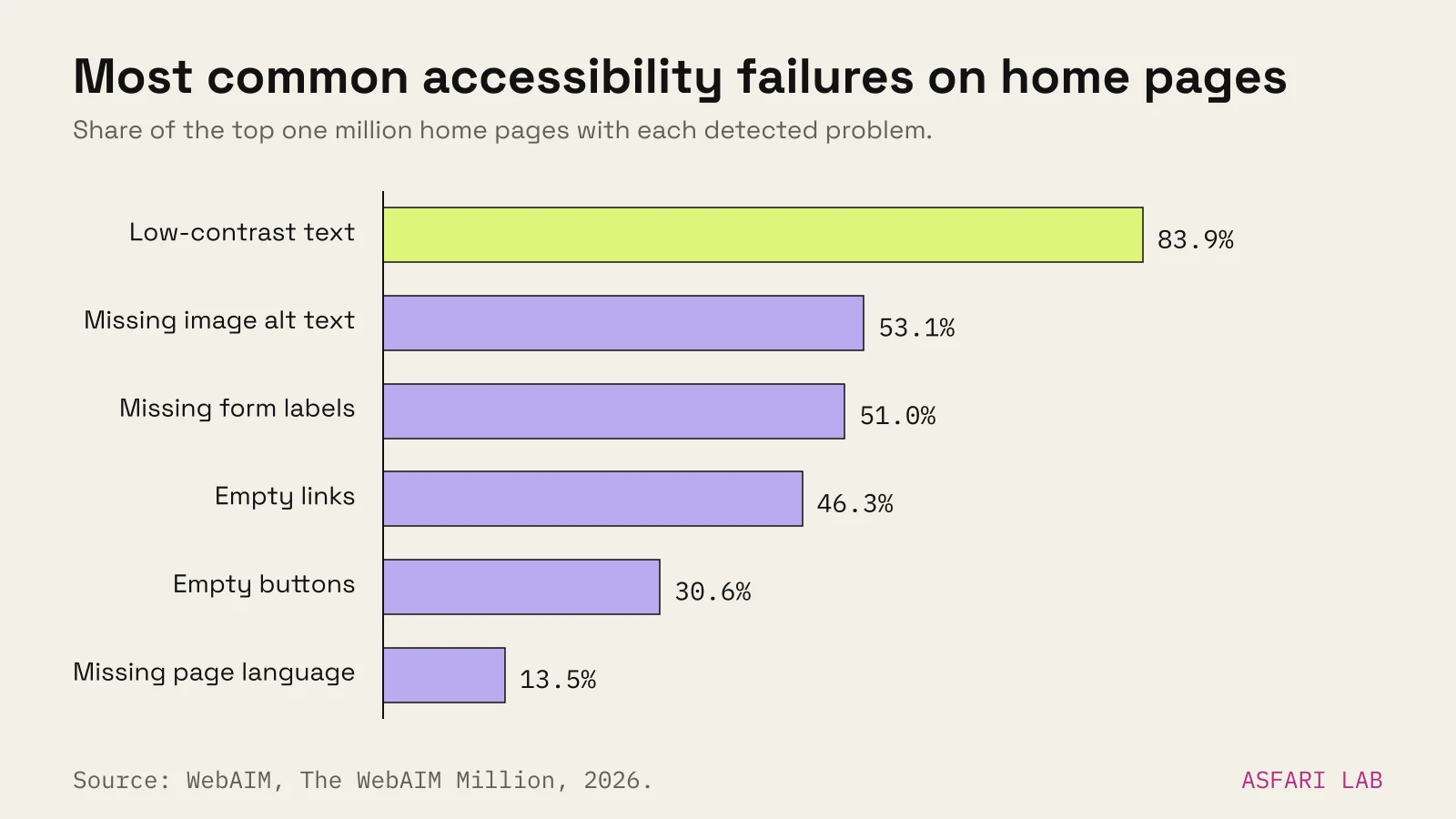
These aren't only nice touches. WebAIM's 2026 scan of the top million home pages found detectable accessibility failures on 95.9% of them. Low-contrast text was the most common problem, on 83.9% of pages. Missing alt text was on 53.1%, and missing form labels on 51%.
What to include in a website footer
The footer is where people look for the boring but important things. In the EU, some of them are required.
The EU e-Commerce Directive says a business offering services online must make these easy to find:
- Business name and physical address.
- Contact details, including an email address.
- Company registration number, if you're on a register.
- VAT number, if you're VAT-registered.
- Supervisory authority or professional body, if your work is regulated.
It also says prices must be clear and say whether they include tax and delivery.
Then add the practical bits:
- Opening hours.
- Links to privacy policy and cookie settings.
- Social links (small, at the bottom, not in the header).
- A repeat of the main button.
Website checklist before launch
Run this the week before you go live. Tick every line.
Legal (EU)
- Privacy policy. The European Commission lists what people must be told when you collect their data. That includes who you are, why you collect it, the legal basis, how long you keep it, who receives it and their rights, including complaining to a data protection authority.
- Cookie consent that works. The EU's Your Europe guide says tracking and analytics cookies can't be set when the page first opens. Consent comes first. Strictly necessary cookies, such as a shopping basket, don't need consent.
- Withdrawing is as easy as accepting. A "Cookie settings" link in the footer does this.
- Accessibility. The European Accessibility Act has applied to many consumer services since 28 June 2025, including e-commerce. Microenterprises providing services (fewer than 10 people and turnover or balance sheet up to €2 million) are exempt. Basic accessibility is still good practice and good for sales.
Speed and mobile
- Test on a real phone. StatCounter puts mobile at 55.41% of web traffic in Europe in September 2026. Most of your visitors are on a phone.
- Run PageSpeed Insights. Google's targets for Core Web Vitals: the main content loads within 2.5 seconds (LCP), the page reacts within 200 ms (INP), and layout shift stays at 0.1 or less (CLS).
- Compress images. Oversized photos are the usual reason a small site is slow.
Forms and buttons
- Submit every form yourself. Check the email arrives, and not in spam.
- Tap every phone number and email link on a phone.
- Click every button. No dead links, no "#".
- Set up Search Console. It's free. It shows which searches show your site and how often people click.
- Submit a sitemap. Google recommends it for new sites. Crawling can still take days to weeks, as we explain in website not showing on Google.
- Check each page title and description. Unique, under about 60 and 155 characters.
- Link your Google Business Profile to the new site.
Handover
- Own your domain and accounts. Registrar, hosting, analytics, Search Console. In your name or your company's.
- Keep a list of logins somewhere safe.
We ran the same list on asfari.digital in October 2026: Search Console, sitemap, IndexNow and schema. PageSpeed now reports mobile performance of 92–95 and an SEO score of 100.
Website requirements checklist: what to agree before the build
If someone is building the site for you, agree these in writing first.
- Number of pages and what's on each.
- Who writes the text and who supplies photos.
- Features: forms, booking, pre-orders, payments, languages.
- Number of feedback rounds.
- Who owns the domain, design files and accounts at the end.
- What happens after launch: fixes, updates, support.
It saves weeks. Our post on how long it takes to build a website shows where the time usually goes.
After launch
A checklist gets you live. It doesn't get you customers. After a month, open Search Console and your analytics. Are people finding you? Are they clicking the main button?
If you have visitors but no enquiries, start with website traffic but no sales.