
This website audit checklist takes about an hour and costs nothing. You need a phone, a laptop and four free tools: PageSpeed Insights, Google Search Console, Chrome and WAVE.
It won't find everything. It will find the problems that cost small businesses the most: a vague first screen, a slow mobile page, missing Google pages, and a contact path that leaks.
Work through the seven groups in order. Mark each check pass or fail. Fix the fails from the top down.
Before you start: the free website audit tools
| Tool | What it checks | Cost |
|---|---|---|
| Your own phone | First impression, tap targets, forms | Free |
| PageSpeed Insights | Speed, Core Web Vitals, basic SEO and accessibility | Free |
| Google Search Console | Indexing, search queries, errors | Free, needs verification |
| Chrome DevTools / Lighthouse | Mobile view, page weight, audits | Free, built into Chrome |
| WAVE (WebAIM) | Accessibility errors on a page | Free browser tool |
Online "website grader free" tools roll several of these into one score. They're a fair start, but the score matters less than the specific failures underneath.
1. The first 10 seconds (checks 1–4)
Nielsen Norman Group's analysis of page-visit data found visitors decide in roughly the first 10 seconds whether to stay. Your first screen must make the case fast.
1. Can a stranger say what you do? Test: show the home page on your phone to someone who doesn't know you, for five seconds. Ask what you sell and who for. Good: they get both right, in their own words.
2. Is there one obvious next step? Test: look at the first screen without scrolling. Good: one main button, such as "Book", "Order", "Get a quote". Not five competing links.
3. Does it say where you are? Test: find your town or service area without scrolling more than once. Good: location in the first screen or the header. Local customers check this first.
4. Does the main image help or just decorate? Test: cover the headline. Does the image alone hint at what you do? Good: a real photo of your product, place or work. Not a generic stock handshake.
2. Mobile (checks 5–8)
Google retired its Mobile-Friendly Test in December 2023 and points to Lighthouse instead. In practice, your own phone is the best test.
5. Does the page fit the screen? Test: open the site on your phone. Scroll every key page. Good: no sideways scrolling, no text cut off, no zooming needed.
6. Are buttons easy to tap? Test: tap every button and menu item with your thumb. Good: no mis-taps. WCAG 2.2 sets a minimum target size of 24 by 24 CSS pixels; bigger is better for main buttons.
7. Does the menu work? Test: open and close the menu. Go to every page from it. Good: it opens, closes and doesn't cover the content you need.
8. Can you complete the form on a phone? Test: fill in your contact or booking form on mobile and send it. Good: the right keyboard appears for email and phone fields, and you get a confirmation. Check the message actually arrives.
3. Speed via PageSpeed Insights (checks 9–11)
Open pagespeed.web.dev, paste your home page and choose Mobile. Then repeat for your most important page.
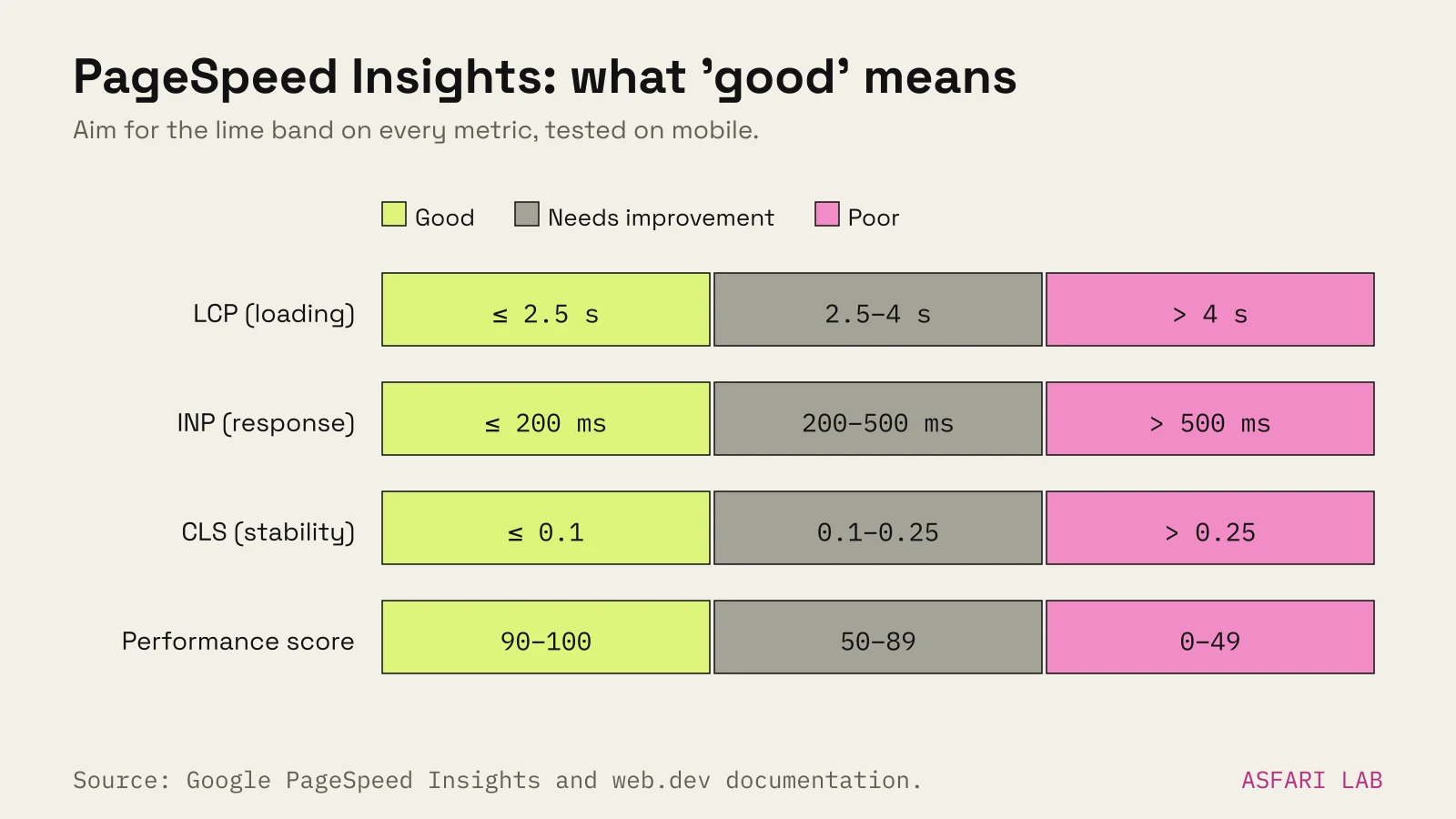
9. Do real visitors pass Core Web Vitals? Test: look at the top section, "Discover what your real users are experiencing". This is field data from real Chrome users over the last 28 days. Small sites may not have enough traffic to show it. Good: Largest Contentful Paint at 2.5 s or less, Interaction to Next Paint at 200 ms or less, Cumulative Layout Shift at 0.1 or less.
10. What's the mobile Performance score? Test: the lab score below the field data. Good: 90–100 is good, 50–89 needs improvement, under 50 is poor. For reference, asfari.digital scores 92–95 on mobile.
11. What's the heaviest thing on the page? Test: in PageSpeed's diagnostics, look for "Improve image delivery" or large network payloads. Or open Chrome DevTools, Network tab, reload, and sort by size. Good: no single image over a few hundred kilobytes. The HTTP Archive found the median mobile home page in 2025 was about 2.56 MB in total, so a much heavier page is a warning sign.
Slow site? Our post on do animations slow down websites explains which effects cost the most.
4. Google (checks 12–16)
12. Is the site in Google at all?
Test: search site:yourdomain.com in Google.
Good: your main pages appear. Google notes this list isn't exhaustive, so use it as a quick look, not a count.
13. Is Search Console set up, and are you an owner? Test: log in at search.google.com/search-console. Good: your property is there and you're a verified owner, not just a user.
14. Are your important pages indexed? Test: in Search Console, open Pages (indexing report). Use URL Inspection on your top three pages. Good: each says it's on Google. If not, the report tells you why. Our post on why a website isn't showing on Google covers the fixes.
15. Does every page have its own title and description?
Test: search site:yourdomain.com and read the blue titles and grey snippets.
Good: each page has a distinct title with what and where, such as "Wedding cakes in Tallinn | Your Bakery". Not "Home" five times.
16. Is your Google Business Profile complete? Test: search your business name on Google Maps. Good: correct hours, category, phone, website link and recent photos. Google lists complete and accurate information as a factor in local ranking.
5. Trust (checks 17–19)
17. Is the site secure?
Test: look for the padlock in the browser bar. Type http:// before your domain and see if it moves you to https://.
Good: always https, with no "Not secure" warning.
18. Can people see real proof? Test: find reviews, client logos you're allowed to show, photos of your team or premises. Good: recent, real reviews with names and dates. BrightLocal's 2026 survey of US consumers found 74% care only about reviews from the last three months.
19. Is it clear who you are? Test: find your company name, address, email and a privacy policy. Good: all in the footer or on a contact page, matching your Google profile exactly.
6. Accessibility basics (checks 20–22)
WebAIM's 2026 scan of the top million home pages found detectable WCAG failures on 95.9% of them. Low-contrast text was the most common, on 83.9% of pages. These three checks catch the big ones.
20. Is the text readable? Test: run WAVE on your home page and look at contrast errors. Good: normal text at least 4.5:1 against its background, large text at least 3:1 (WCAG AA).
21. Do images have alt text? Test: WAVE flags missing alternative text. Missing alt text appeared on 53.1% of pages in WebAIM's scan. Good: every meaningful image has a short description; decorative images are marked as such.
22. Do forms have labels? Test: WAVE flags missing form labels. Then try tabbing through your form with the keyboard only. Good: every field has a visible label, and you can reach and send the form without a mouse.
For online shops, accessibility is now a legal question too. The European Accessibility Act covers e-commerce services from 28 June 2025, with an exemption for service-providing microenterprises. See the European Accessibility Act for online shops.
7. Conversion (checks 23–25)
23. Can you contact the business in two taps from any page? Test: from a deep page, try to reach the contact form or email. Good: a button in the header or a sticky bar on mobile.
24. Is the main action the same everywhere? Test: look at the main button on each page. Good: one consistent action, with consistent wording.
25. Do you know where enquiries come from? Test: send a test enquiry. Check that it appears in your analytics as a conversion. Good: you can see how many enquiries, bookings or sales each page produced last month. Traffic without this is guesswork. Our post on website traffic but no sales goes deeper.
Scoring your website audit checklist
Count your passes.
- 22–25: a healthy site. Fix the fails and re-check each quarter.
- 15–21: working, but leaking enquiries. Start with any fails in groups 1, 2 and 7.
- Under 15: the site is probably costing you customers. Fix the first screen and mobile first, then speed.
This scoring is our own rule of thumb, not an industry standard. The point is to rank fixes, not to grade yourself.
Want a printable version? Copy this list into a document and save it as a website audit checklist PDF. Our small business website checklist covers what to include when you build or rebuild.