
If you sell online to consumers in the EU, the European Accessibility Act has applied to your shop since 28 June 2025. Unless you are a microenterprise.
That means fewer than 10 employees and annual turnover or balance sheet total of no more than €2 million. If you are above that line, your whole buying journey must be accessible: product pages, search, cart, sign-in, checkout and payment.
The practical benchmark is WCAG level AA, through the European standard EN 301 549. Below is what the law says, what it means for a small shop, and a checklist you can work through.
This is a practical guide, not legal advice. For your specific case, ask a lawyer or your national authority.
What the European Accessibility Act is
The European Accessibility Act is Directive (EU) 2019/882. It sets common accessibility rules for certain products and services across the EU.
E-commerce services are on the list, in Article 2(2). The directive defines them as services provided at a distance, through websites and mobile apps, by electronic means, at a consumer's request, with a view to concluding a consumer contract.
In plain words: if a consumer can buy from you on your website or app, you are an e-commerce service. It doesn't matter whether you sell shoes, coffee or courses.
Each EU country turned the directive into national law. In Estonia it is the Products and Services Accessibility Act (toodete ja teenuste ligipääsetavuse seadus), supervised by the Consumer Protection and Technical Regulatory Authority (TTJA).
Does it apply to my shop?
Work through these three questions.
- Do you sell to consumers in the EU? Business-to-business only shops are outside the e-commerce definition, which refers to consumer contracts.
- Are you a microenterprise? Article 4(5) exempts microenterprises providing services. Both tests must be met: fewer than 10 people, and turnover or balance sheet total of €2 million or less.
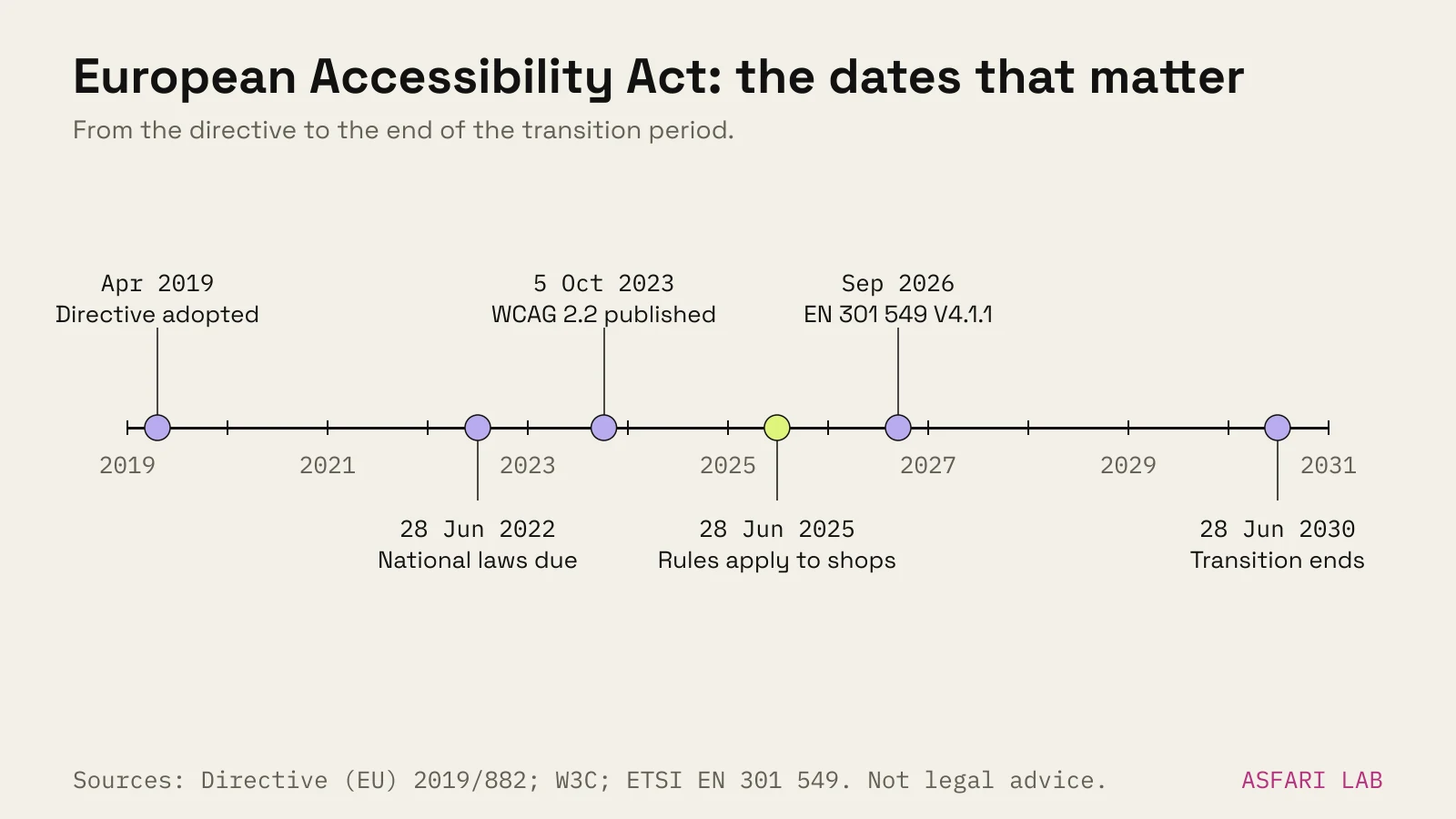
- When did your service start? The rules apply to services provided after 28 June 2025. National law can allow transition periods for older contracts, and for products already used to provide the service, until 28 June 2030; the TTJA guidance mentions this for Estonia.
| Your shop | Does the EAA apply? |
|---|---|
| 4 staff, €600k turnover, sells to consumers | No, microenterprise exemption |
| 12 staff, €1.5m turnover, sells to consumers | Yes, more than 9 staff |
| 6 staff, €3m turnover, €2.5m balance sheet | Yes, both money figures above €2m |
| 6 staff, €3m turnover, €1.8m balance sheet | No, one money figure is under €2m |
| 30 staff, sells only to businesses | Generally no, not a consumer service |
If you are exempt, it is still worth doing. Disabled and older shoppers buy online too, and an accessible shop is usually a clearer shop for everyone. You may also outgrow the exemption sooner than you think.
European Accessibility Act requirements for ecommerce
The directive's Annex I lists what services must do. For e-commerce the core points, in plain English:
- The website and app must be perceivable, operable, understandable and robust. These are the four WCAG principles.
- Identification, security and payment must work the same way for disabled users: sign-in, one-time codes, card entry, wallet buttons.
- Information about accessibility of the products you sell must be shared where the manufacturer or responsible operator provides it.
- Information about your service must be accessible: how it works, its accessibility features, and how it supports assistive tech.
Article 13 also requires you to explain how your service meets the requirements, in a public document. The directive points to your general terms and conditions or an equivalent document; many shops use a separate accessibility statement linked from the footer. The TTJA guidance says it must be available in accessible written and oral formats and kept for as long as the service runs.
European Accessibility Act and WCAG
The directive doesn't name WCAG directly. It works through harmonised standards. Meeting a standard cited in the EU Official Journal gives a "presumption of conformity".
For websites that standard is EN 301 549. The version referenced by the TTJA, V3.2.1, uses WCAG 2.1 levels A and AA.
A new version, EN 301 549 V4.1.1, was published in September 2026 and references WCAG 2.2 A and AA. Legal commentators writing in September 2026 noted that its main legal effect only comes once it is cited in the Official Journal, so check its status before relying on it for presumption of conformity.
Our advice: build to WCAG 2.2 AA now. It contains everything in 2.1 AA, plus a few criteria that matter on shop pages:
| WCAG 2.2 criterion | Level | What it means in a shop |
|---|---|---|
| 2.4.11 Focus not obscured | AA | Sticky headers and cookie bars must not hide the focused button |
| 2.5.7 Dragging movements | AA | Sliders and drag carousels need a click alternative |
| 2.5.8 Target size (minimum) | AA | Buttons and swatches at least 24 × 24 CSS px, or spaced out |
| 3.2.6 Consistent help | A | Contact or help link in the same place on every page |
| 3.3.7 Redundant entry | A | Don't make people type the same address twice |
| 3.3.8 Accessible authentication | AA | No memory puzzles at login; allow paste and password managers |
Practical checklist for an online shop
Work through this in order. The first block catches most problems.
Quick wins (a day or two)
- Every product image has alt text that describes the product, not the file name.
- Swatches and size buttons have text labels, not only colour.
- Colour contrast for text and buttons meets AA (4.5:1 for body text).
- Every form field has a visible label, not just placeholder text.
- Errors say what went wrong and how to fix it, in text.
- Buttons and swatches are at least 24 × 24 px.
Keyboard and screen reader (a week)
- You can reach and use everything with Tab, Enter and Space: menu, filters, swatches, cart, checkout.
- The focus outline is visible and never hidden behind a sticky bar.
- Pop-ups and cart drawers can be closed with Esc and return focus.
- Carousels and auto-playing video can be paused. Respect the reduced-motion setting; see our guide to accessible website animation.
- Test the key flows with a screen reader: VoiceOver on Mac and iPhone, NVDA on Windows.
Checkout and payment
- Login allows paste and password managers. No image puzzles without an alternative.
- Delivery and billing address can be copied with one tick.
- Payment widgets from your provider are tested too. You are responsible for the whole journey, even the parts you embed.
- Order confirmations and invoices are accessible (tagged PDF or HTML email).
Paperwork
- Publish an accessibility statement: what conforms, what doesn't yet, and how to contact you.
- Keep a short record of your tests and fixes, with dates.
- If you claim something is a "disproportionate burden" under Article 14, document the assessment. The directive's recitals say lack of priority, time or knowledge is not a valid reason.
For the wider checkout, see our checkout checklist. For product pages, see product page examples.
Enforcement: who checks, and what happens
National authorities enforce the act. Article 23 requires each country to check services, follow up complaints and verify fixes. Article 30 says penalties must be "effective, proportionate and dissuasive", and each country sets its own amounts.
In Estonia the supervisor is the TTJA, which also receives notices when accessibility requirements are not applied.
Penalty levels differ between countries, and summaries we found online disagree on the exact Estonian figures, so we don't quote one here. Check your national authority's page. Some authorities have started with guidance: the Dutch regulator, for example, asked e-commerce providers to fix what they could before reporting what they couldn't.
Platforms help but don't make you compliant. When we build online shops we test the full journey, not just the theme demo. Shopify and WooCommerce themes vary widely. Apps and custom code can break accessibility that the theme got right. "Overlay" widgets that promise one-line compliance don't fix the underlying code.