The best restaurant website examples do three things on the first screen. Show the menu as real text. Put a booking button where your thumb is. Say when you're open and where you are.
Everything else is mood. Mood matters, but only after those three. It's how we plan every restaurant or hospitality website we build.
If you take orders, decide early whether they run through your own site or through delivery apps. The commission difference is big. Most restaurants end up using both.
What diners look for
A 2021 YouGov poll for Wix found 70% of UK adults view restaurant websites. 41% check menus online to work out what a meal will cost. And 31% said the most irritating thing was a restaurant site with no menu at all.
The same poll found 17% were annoyed by menus that were hard to reach, such as a downloadable file.
It's a UK poll, and a few years old. The pattern hasn't changed: people come for the menu, the prices and a way to book.
Reviews push them there too. BrightLocal's 2026 survey of US consumers found 54% visit a business's website after reading positive reviews. 68% only use businesses rated four stars or more.
What good restaurant website examples have in common
| Element | Good | Common mistake |
|---|---|---|
| Menu | Text on the page, with prices | A PDF or a photo of the printed menu |
| Booking | One button, live availability | "Call us" only, or a form with no reply |
| Hours | On the home page, updated for holidays | Hidden in the footer, out of date |
| Location | Address, map, nearest parking or stop | Map only, no address to copy |
| Photos | The room, the plates, the street front | Stock food photos |
| Ordering | A clear "Order" link, pickup and delivery | Five delivery app logos, no context |
| Speed | Loads fast on a phone | A full-screen video that takes ages |
Use that table to judge any restaurant website example you're inspired by. A beautiful site that hides the menu is a bad example.
A website for a restaurant menu: HTML, not PDF
This is the single biggest fix for most restaurant sites.
A PDF menu is built for paper. On a phone, people pinch, zoom and scroll sideways. Nielsen Norman Group advises against PDFs for on-screen reading because they're hard to scan and slow to load. A text menu reads well on any screen, works with screen readers and can be found by Google.
How to write the menu:
- Sections as headings. Starters, mains, desserts, drinks.
- Name, a one-line description, price. That's enough.
- Mark allergens and diet tags. Vegan, gluten-free, contains nuts. A small symbol and a key.
- Date it, or keep it current. A menu from last season is worse than none.
- Keep one PDF only if people want to print it, such as a set menu for groups.
Then connect it to Google. In your Google Business Profile, food businesses can add a menu link pointing to your menu page. Google's menu editor can also hold items and prices directly. Keep both in step with your website.
Website for restaurant reservations
Most restaurants should use a booking tool rather than build their own. They handle availability, reminders and no-shows.
What to look for:
- Works on your site and on Google. Reserve with Google lists booking partners, including OpenTable, Resy, SevenRooms, Quandoo, ResDiary, Formitable and CoverManager, so customers can book from Search and Maps. Check which ones operate in your country.
- Reminders by email or text. Fewer empty tables.
- Deposits or card holds for big groups and busy nights.
- Your guest data. Can you export your customer list? Read the terms.
On the website, the booking button should open the booking widget directly. Not a page about booking. Not a form someone answers tomorrow.
If you mainly get bookings by phone, show the number as a tap-to-call link. But give people who'd rather not call a way to book too.
Online ordering website for restaurants: own vs delivery apps
Delivery apps bring you new customers. They also take a large cut.
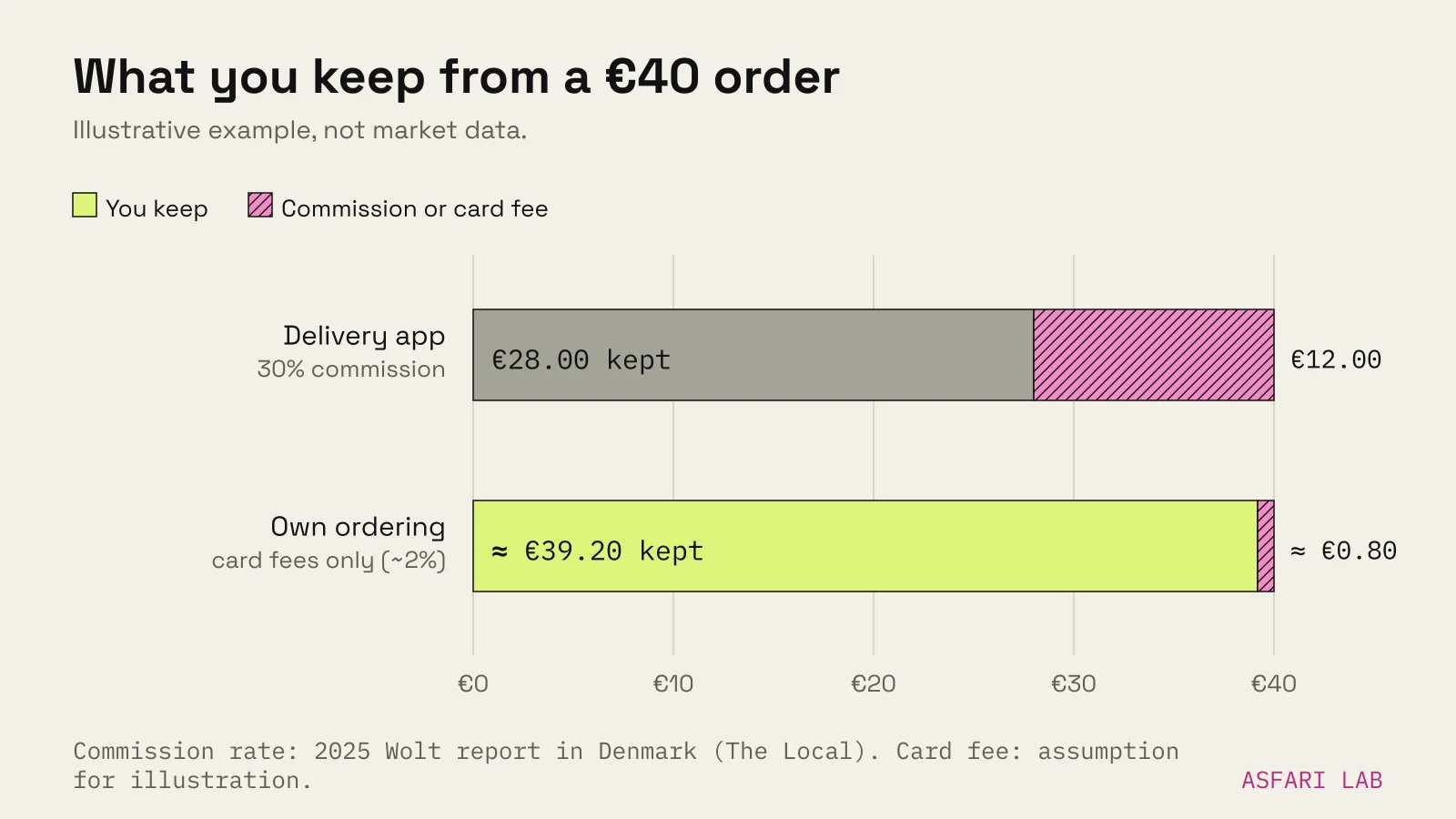
How large varies by country and contract. In a 2025 dispute in Denmark, Wolt's commission was reported as 30 percent, citing Wolt's own website. Commission rates are negotiated, so treat that as one data point, not a price list.
| Delivery apps | Your own ordering | |
|---|---|---|
| New customers | Yes, the app brings them | No, you bring them |
| Commission | Often a large share per order (30% reported for Wolt in Denmark, 2025) | Payment and software fees only |
| Delivery | Done for you | You arrange it, or offer pickup only |
| Customer data | Mostly the app's | Yours |
| Set-up | Quick | More work |
A practical mix for many restaurants:
- Pickup on your own site. Regulars order direct. You keep the margin.
- Delivery through one or two apps. For reach.
- Set your own link as preferred on Google. In the Food ordering section of your Business Profile, you can add your own ordering link and mark a provider as preferred for pickup or delivery.
Tell regulars directly. A card in the takeaway bag with "Order direct for pickup" and the web address does more than any banner.
Photos and the rest of the page
Photograph the room. People choose restaurants for a date, a birthday, a business lunch. Let them see the space in daylight and at night.
Photograph your real dishes. Natural light, close up, the plate you actually serve.
Keep video short. A muted, looping clip of the kitchen can work. A heavy full-screen film that delays the menu doesn't.
Group bookings and events. A short section with capacity, set menus and how to enquire. These are big orders; make them easy.
Footer basics. Business name, address, email, registration and VAT details where required, privacy policy and cookie settings.
How this compares to a bakery or café
A bakery sells today's cabinet and pickup orders. A restaurant sells an evening. The booking button carries more weight, the room photos matter more, and delivery commission becomes a real business decision. We cover the bakery side in website for a bakery or café.
Our own Pistache example, made in the lab, shows the shared principle: one clear offer, one main button, practical details on the same page.
For being found in the first place, work through our local SEO checklist. For the reviews that send people to your site, see how to get Google reviews.