3D renders work on both Amazon and Shopify, but not in the same way.
On Amazon, renders are safe for secondary images, A+ content and ads. The main image is the strict one: Amazon's policy asks for a photograph of the actual product, on pure white, filling at least 85% of the frame. Amazon also lets you upload 3D models for "View in 3D".
On Shopify, there are no such limits. Renders can be any image, and you can upload the 3D model itself (GLB or USDZ) so shoppers can spin it and see it in AR.
Here is how to use 3D product rendering for Amazon and Shopify without breaking rules, and where AI tools help or hurt.
Amazon's image rules, in plain English
Amazon's full image requirements live in Seller Central, behind a login. The rules below are as quoted by an Amazon staff account on the Seller Central forums, and match long-standing seller guides.
Main image (the one in search results): - Pure white background, RGB 255, 255, 255. - The product fills 85% or more of the frame. - At least 1,000 px on the longest side, so zoom works. - It shows the actual product being sold. No illustrations. - No text, logos, borders, watermarks or extra props.
The wording in the policy quoted by sellers is that main images must be "professional photographs of the actual product". Graphics, illustrations, mock-ups and placeholders are not allowed there.
Secondary images (slots 2 onwards): Much more freedom. Lifestyle scenes, close-ups, exploded views, infographics, size comparisons and mock-ups are all used. They must still be accurate and not misleading.
3D product rendering for Amazon: where it fits
| Image slot | Can you use a 3D render? | Our advice |
|---|---|---|
| Main image | Policy asks for a photograph; renders are a risk | Use a photo, or a render that is indistinguishable and exact, at your own risk |
| Secondary images | Yes | Ideal for angles, colourways, details |
| Exploded or cut-away view | Yes | Renders do this better than any camera |
| Lifestyle scene | Yes | Keep scale and colour exact |
| Infographic with callouts | Yes | Render first, add text in design |
| A+ content (brand pages) | Yes | Renders keep every module consistent |
| Sponsored Brands and display ads | Yes | Same model, new crop |
| View in 3D | Upload the model itself | Upload through Image Manager in Seller Central |
Photoreal renders can be hard to tell from photos, and some sellers use them in slot one. But the policy text says photograph, and enforcement can change. If a listing is your main income, don't bet it on a render in slot one. Shoot one clean main photo, and render the rest.
What "accurate" means
The render must match the product the customer receives. Same colour, same proportions, same parts in the box. A render that looks better than the product invites returns and bad reviews.
Amazon View in 3D
Amazon's seller site says you can upload existing 3D models through Image Manager in Seller Central, if they meet its technical requirements. Shoppers can then pinch, zoom and rotate the product, and for furniture and decor see it in their room with AR. Amazon says adding 3D and AR costs nothing extra.
Amazon's seller site also mentions two other routes: scanning the product with the Create 3D Models feature in the Amazon Seller app, or hiring a 3D provider from its Service Provider Network.
Amazon also stopped showing the old 360° spin images in January 2025, according to a 3D studio that works with Amazon furniture sellers. The model-based viewer is what replaced it. Amazon validates the model, so it needs clean geometry and real-world scale.
Shopify 3D model support
Shopify is the easier platform. Two things are possible.
1. Renders as normal product images. Use them as your lead image, gallery, variant images and collection thumbnails. No rules beyond your own taste.
2. The 3D model as product media. According to Shopify's help centre: - Shopify accepts GLB and USDZ files, up to 500 MB. - It converts each upload so both formats exist, for Android and iPhone. - Files over 15 MB are optimised automatically. - All Shopify-built Online Store 2.0 themes and the Horizon family support 3D. Most third-party themes do in recent versions.
The 500 MB limit is not a target. Shopify's own partner checklist recommends a total of about 4 MB, textures no larger than 2048 × 2048 px for mobile web, one material where possible, real-world scale, and the origin at the product's base. Small files load fast, and AR launches cleanly.
In 2022 Shopify reported that merchants who add 3D content see a 94% average conversion lift. That is Shopify's merchant data, not a controlled test, but it shows why a model is worth having. Our Shopify 3D model viewer guide covers setup step by step.
Variant images on Shopify
Shopify lets you attach an image to each variant. Choose "oak" and the gallery jumps to oak. With photography, every variant needs its own shoot. With 3D, you change a material and re-render, so every colour gets the same angle and the same light. That consistency matters on collection pages, where 20 products sit side by side and any odd shadow stands out. We cover variant swatches and other patterns in product page examples.
Amazon vs Shopify for 3D, at a glance
| Amazon | Shopify | |
|---|---|---|
| Renders as main image | Policy asks for a photo | Allowed |
| Renders as other images | Allowed, must be accurate | Allowed |
| 3D model viewer | View in 3D, via Image Manager | Built in, as product media |
| AR in the shopper's room | View in Your Room (furniture, decor) | AR from the same model |
| Accepted 3D formats | GLB or glTF, per 3D vendors | GLB and USDZ |
| Extra cost for 3D | None, per Amazon | None for native viewer |
One model, two platforms
The point of 3D is that one model feeds everything.
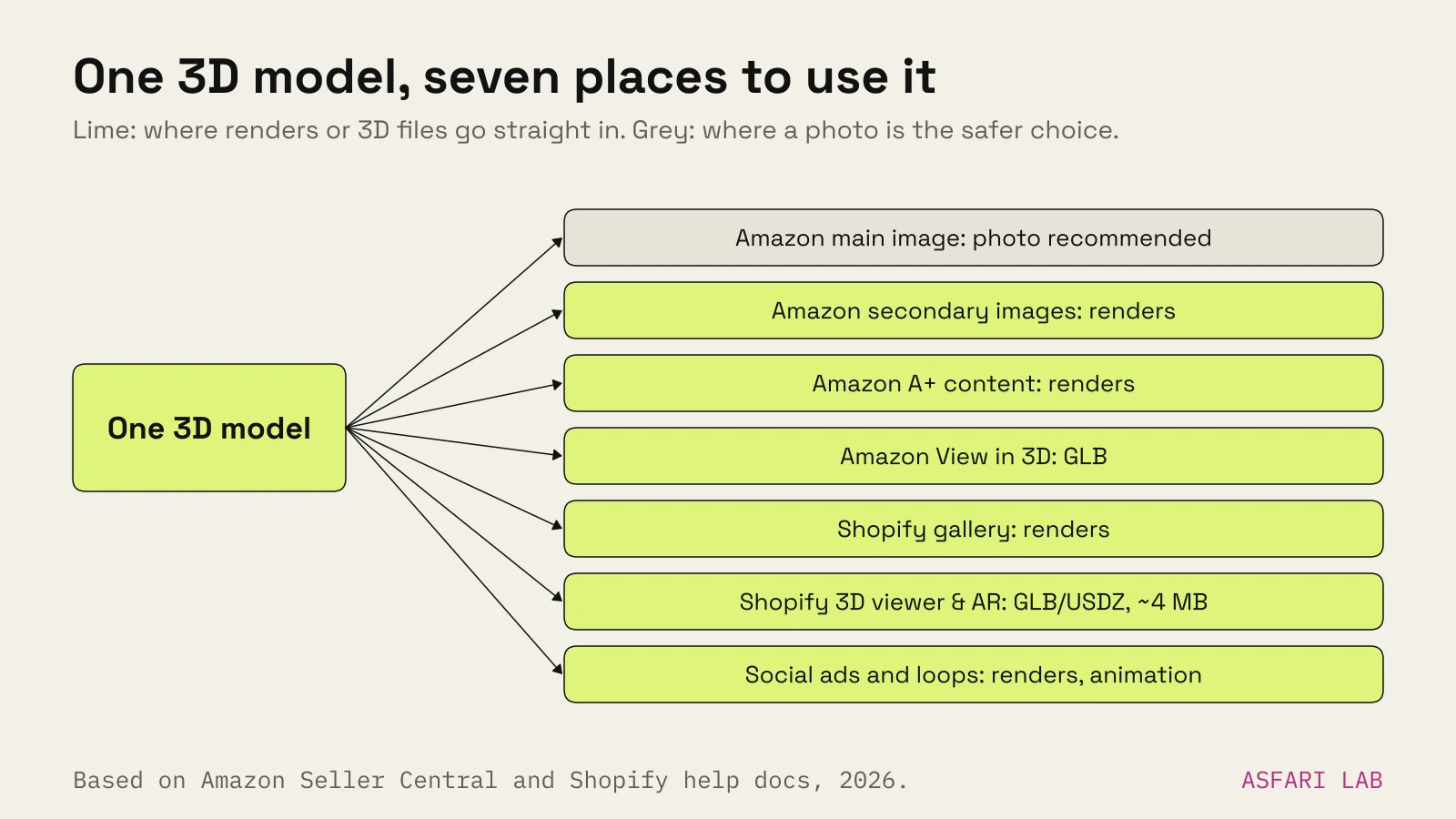
A good order of work, and the one we follow for 3D product renders: 1. Build one accurate, high-detail model for rendering. 2. Render the stills: white background, angles, colourways, details, exploded view. 3. Make a light version of the model (around 4 MB) for Shopify and Amazon's 3D viewers. 4. Export crops for each channel: square for Amazon, square or 4:5 for Shopify, 4:5 and 9:16 for social.
That is why the price of a model matters more than the price per image. We break that down in 3D product rendering cost, and compare it with shoots in product photography cost.
3D product rendering and AI: where it helps
AI image tools are good at backgrounds and moods. They are weak at exact products. They can quietly change a label, a seam, a button or a colour.
Our rule: - Use AI around the product, not on it. Generate a room, a surface, a sky. Keep the product itself a true render of the 3D model. - Never let AI redraw your product for Amazon's main image. Seller guides warn strongly against it. - Check every AI-assisted image against the real product before it goes live. Colour, shape and text. - Disclose where rules require it. Amazon has a listing attribute for synthetic people, according to one seller tool. In ads, EU rules on AI-generated content may apply; see the EU AI Act and AI-generated ads.
A 3D model also gives AI video tools a clean, accurate start frame. See AI product video from a single image for how we do that.