
About 70% of online carts are abandoned. Baymard Institute's average across 50 studies is 70.22%.
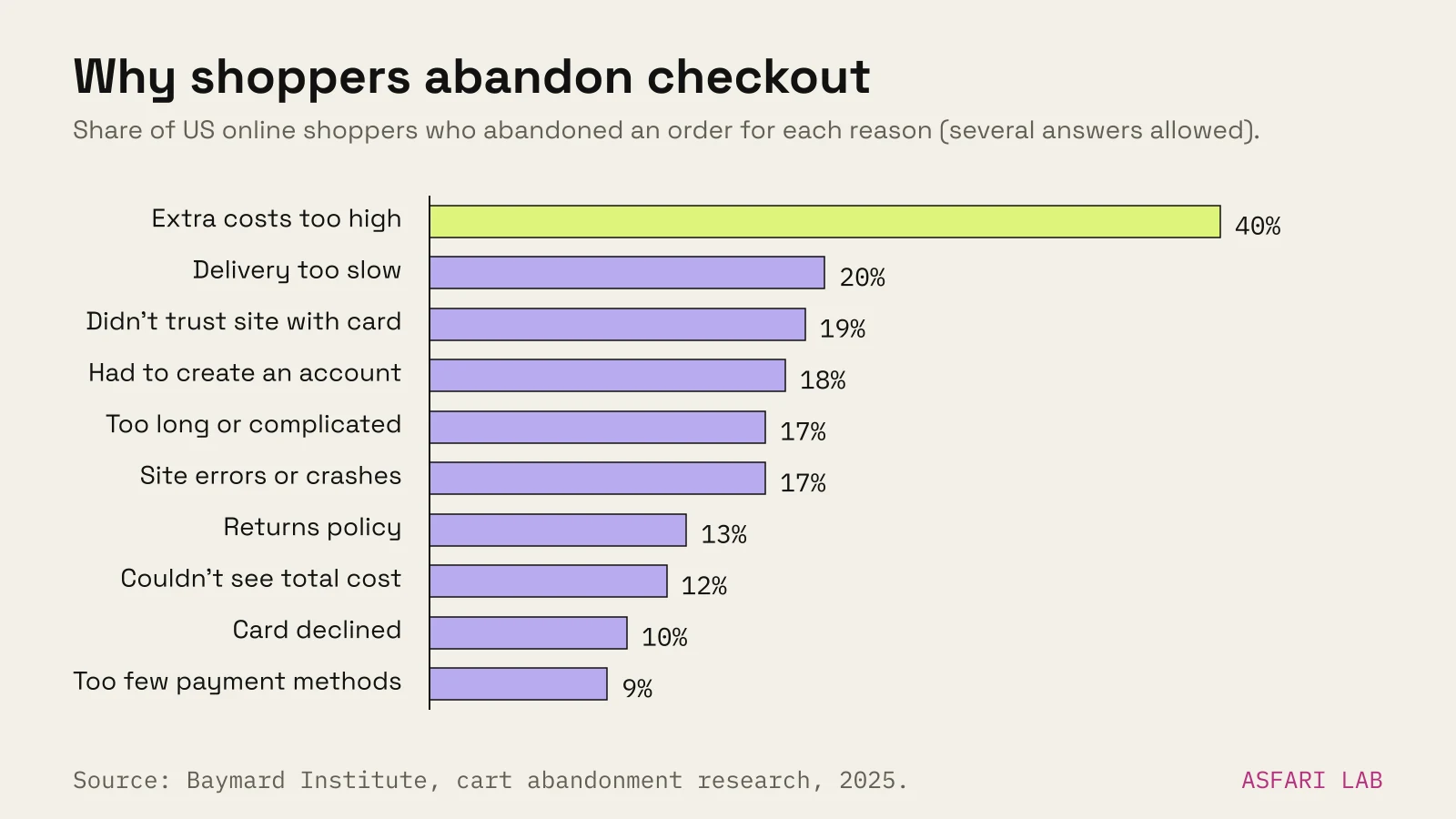
Why do customers abandon cart? Mostly because of surprises at checkout. The top reason, by a wide margin, is extra costs: shipping, tax and fees that appear late. Slow delivery, distrust, forced accounts and long forms follow.
Many abandoned carts were never real purchases. Some were. Those are the ones you can win back.
Below are the reasons, one fix for each, and how recovery emails fit in.
The cart abandonment rate, in context
Baymard's 70.22% is an average of documented abandonment rates. Your own number will differ by product, price and traffic source.
A large share is people browsing. In Baymard's survey of US online shoppers, 42% had left a cart because they were just looking or not ready to buy. That is normal shopping behaviour, and no checkout fix changes it.
Leave those out, and the remaining reasons are mostly fixable. Baymard estimates that better checkout design could lift conversion by about 35% for a large ecommerce site.
Why do people abandon online shopping carts?
Here are the reasons Baymard found, excluding "just browsing". Shoppers could give more than one.
| Reason for abandoning during checkout | Share |
|---|---|
| Extra costs too high (shipping, tax, fees) | 40% |
| Delivery was too slow | 20% |
| Didn't trust the site with card details | 19% |
| The site wanted me to create an account | 18% |
| Checkout too long or complicated | 17% |
| Website had errors or crashed | 17% |
| Returns policy wasn't satisfactory | 13% |
| Couldn't see or calculate total cost up front | 12% |
| Credit card was declined | 10% |
| Not enough payment methods | 9% |
Source: Baymard Institute, survey of US adults who shop online, last updated 22 September 2025.
The survey is of US shoppers. Behaviour in Europe is similar in kind, though payment habits differ. In Estonia, for example, many people expect to pay by bank link.
12 fixes, one per reason
1. Extra costs too high: show shipping before checkout
Put delivery prices on product pages and in the cart. If you can, build shipping into prices or set a free-delivery threshold.
In the EU, show consumer prices with VAT included. A price that grows at the last step feels like a trick.
2. Delivery too slow: show a date, not a speed
"Arrives Thursday 30 October" beats "2–4 working days". Baymard's checkout research recommends delivery dates over durations.
Offer at least one fast option, even at a cost. In the Baltics and Nordics, parcel lockers are often both fast and cheap.
3. Didn't trust the site: show it is real and cared for
Trust comes from small signals. Real product photos, a clear company name and address, a returns page, working contact details, recognisable payment logos near the pay button.
A shop that looks unfinished loses card details first.
4. Forced account creation: make guest checkout the obvious path
Let people buy without an account. Offer to save their details on the confirmation page, after they have paid.
5. Checkout too long or complicated: cut fields
Baymard found the average US checkout shows 23.48 form elements. An ideal one needs 12–14.
Remove "company name" for consumers, combine name fields, hide the second address line behind a link, and use address autocomplete. Our checkout checklist goes through it field by field.
6. Site errors or crashes: test checkout like a customer
Test every payment method on a real phone after each theme or plugin update. Watch for slow loading, broken discount codes and error messages that do not say what is wrong.
This matters more on self-hosted shops. See Shopify vs WooCommerce for who owns updates on each.
7. Returns policy unsatisfactory: say it plainly, early
EU consumers already have 14 days to cancel most online purchases. Say so in plain words on product pages and in the cart.
If you can afford free returns, say that too. If you cannot, state the return cost up front. EU rules require you to tell buyers before purchase if they pay for returns.
8. Couldn't see total cost up front: add a shipping estimator
Let people see the full total, delivery included, in the cart. Ask for a country or postcode, not a full address.
This overlaps with fix 1, and it is cheap to do on any platform.
9. Card declined: offer a second way to pay
Declines happen. Make the error message say what to try next, keep the basket intact, and offer another method on the same screen: a wallet, a bank link, or pay-later.
10. Not enough payment methods: match your market
Cards plus Apple Pay and Google Pay cover a lot. Then add what your customers expect locally. In Estonia that means bank links. Elsewhere it may be iDEAL, Bancontact, MobilePay or Klarna.
Check the fee before you add each one. Klarna, for instance, costs more than cards on most platforms. Our online shop cost guide lists the rates.
11. Just browsing: make it easy to come back
You cannot convert browsers today. You can make returning easy.
Keep the cart saved between visits. Offer a wishlist or "email me this cart". Show stock and delivery dates so the decision is ready when they are.
12. Win back the rest with cart abandonment emails
When someone leaves a cart after giving their email, send a reminder. This is the most direct recovery tool you have. More on it below.
Cart abandonment emails that work
A recovery email reaches people who were close to buying. It does not need tricks.
Klaviyo's 2026 abandoned-cart benchmark, from over 110,000 of its customers, puts the average click rate of abandoned-cart emails at 6%. The top 10% of brands reach 11.3%. Average revenue per recipient is $6.77 (about €6.05), rising to $13.70 (about €12.24) for the top 10%.
Those figures are for brands using a dedicated email tool. Treat them as a ceiling to aim for, not a promise.
A simple flow:
- First email, a few hours later. Klaviyo's sample sequence sends it after 2–4 hours. Show the products, the total and one button back to the cart.
- Second email, the next day. Answer the likely objection: delivery time, returns, sizing.
- Optional third email. A small incentive, if your margins allow it. Do not train customers to wait for discounts.
In the EU, you need a lawful basis for these emails. Get your consent and privacy wording checked for your market.
Shopify and WooCommerce both support abandoned-checkout emails, built in or through an app. Turn them on before you launch.
Where to start
You do not need all twelve fixes at once. Start where the numbers are.
- Show delivery costs and dates on product pages (fixes 1, 2, 8).
- Make guest checkout the default (fix 4).
- Turn on abandoned-cart emails (fix 12).
- Test the checkout on a phone, every payment method (fixes 6, 9).
That tackles the biggest reasons in Baymard's list, including the top one.