
Choose Shopify unless your shop has to do something Shopify cannot do well. For most small and mid-sized shops, that means Shopify.
Custom pays off in three cases: a product configurator that drives the sale, B2B rules that templates cannot express, or a catalogue that does not fit "product with variants".
Between the two sits a middle path that most brands overlook. A custom-designed theme on Shopify gives you a shop that looks and works like yours, while Shopify still handles checkout, hosting and security.
Here is how to decide on Shopify vs custom website, with honest costs.
What "custom" actually means
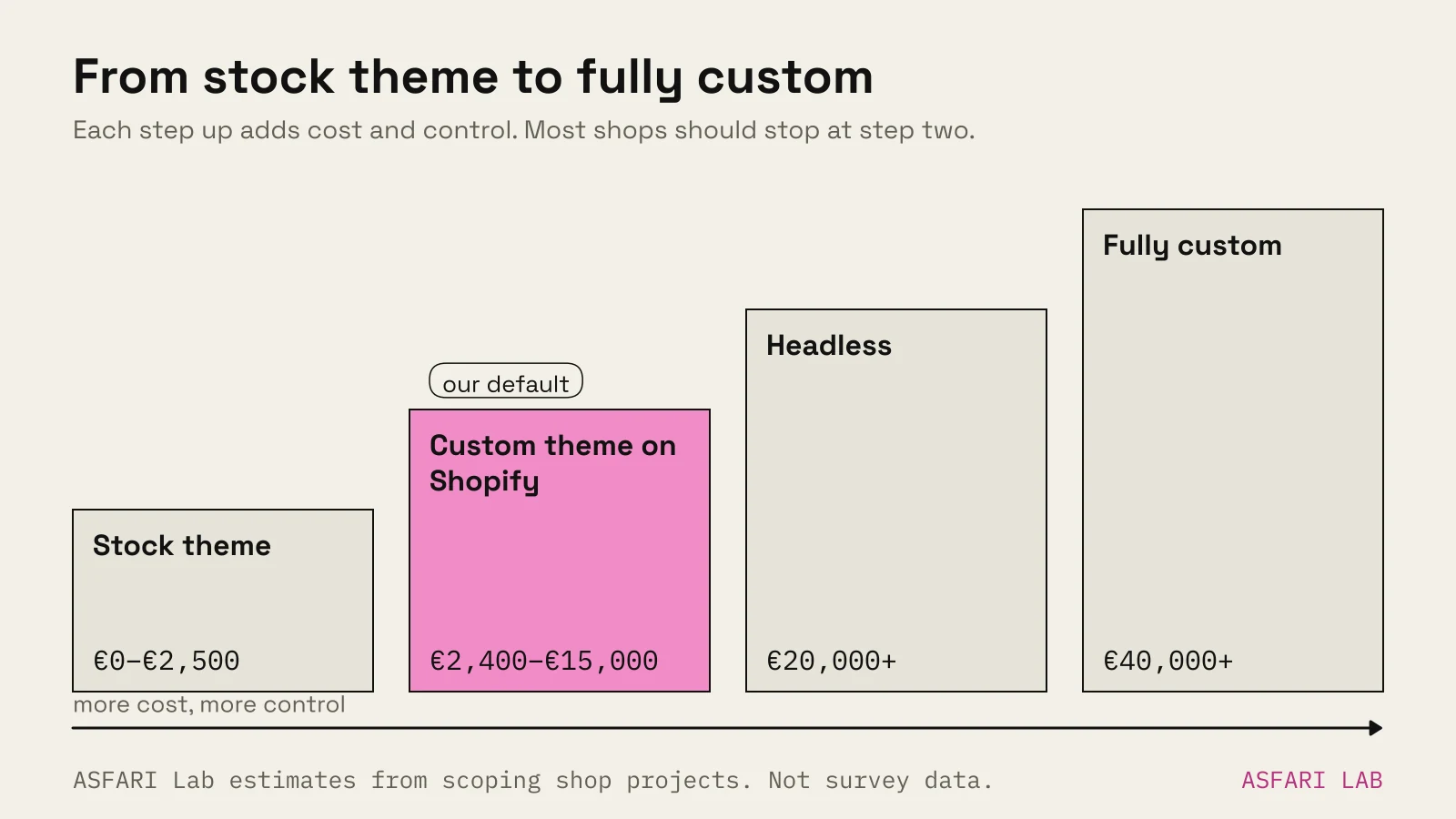
People use "custom" for three very different things. Get this straight before you compare quotes.
| Option | What you get | Typical upfront cost | Running cost |
|---|---|---|---|
| Shopify with a stock theme | A theme you configure, plus apps | €0–€2,500 (our estimate, with setup help) | Plan + apps |
| Custom theme on Shopify | Your own design and templates, Shopify underneath | €2,400–€15,000 (our estimate) | Plan + apps + occasional developer time |
| Headless (custom front end + Shopify or other back end) | Your own front end, commerce engine behind it | €20,000+ (our estimate) | Hosting, developer retainer, plan |
| Fully custom ecommerce | Everything built for you: catalogue, cart, checkout, admin | €40,000+ (our estimate) | Hosting, security, payments, developer retainer |
These ranges are our estimates from scoping shop projects, not survey data. Scope moves them more than anything else.
Our online shop cost guide breaks down the lower tiers and monthly fees in detail.
Shopify vs custom ecommerce: what you trade
Shopify gives you a lot for €24–€289 a month. A fully custom build has to recreate it.
What Shopify includes that custom has to build or buy:
- Hosting, security patches and uptime.
- A checkout that handles cards, wallets and local payment methods.
- Tax settings, VAT validation and multiple markets.
- Up to 20 selling languages on Basic to Advanced.
- An admin your team can learn in a day.
What custom gives you that Shopify limits:
- Any product logic you can describe.
- Full control of the checkout. On Shopify, apps that change the information, shipping and payment steps are Plus-only.
- Your own data model, hosting location and integrations.
- No platform transaction fee when you use your own payment provider.
The honest summary: custom buys freedom, and you pay for it twice. Once to build, then every year to maintain.
When custom earns its cost
Custom is worth it when the thing Shopify cannot do is the thing that sells.
1. A configurator is the product
If customers build their product, the configurator is the shop. Made-to-order furniture, bikes, kitchens, signage, jewellery with engraving.
Shopify variants have practical limits, and apps only go so far. A real configurator needs live pricing, rules about what fits with what, and often 3D. Our post on 3D product configurator cost gives real ranges for build vs buy.
Even here, you can often keep Shopify for checkout and embed the configurator on the product page.
2. B2B rules a template cannot express
Trade customers with their own price lists, minimum quantities, approval steps, invoice payment or credit limits. Some of this is possible on higher Shopify plans and with apps. When the rules get specific to your business, custom logic becomes cleaner than a stack of apps.
3. An unusual catalogue
Some catalogues do not fit "product with up to a few options". Spare parts matched to machine models. Fabric sold by the metre in any length. Tickets with seats. Rentals by date.
If every product page needs a workaround, the platform is fighting you.
4. Volume where the fees matter
At high revenue, platform and app fees add up. A custom stack can be cheaper per order. That only holds when you have the team to run it.
When custom does not pay off
Most reasons people give for going custom are better solved another way.
- "We want it to look unique." A custom theme on Shopify does this.
- "We want 3D product views." Shopify supports 3D models and AR natively. See our Shopify 3D model viewer guide.
- "We don't want to pay monthly fees." Custom has monthly costs too: hosting, security and a developer.
- "Shopify is too limited for SEO." A well-built Shopify theme ranks fine. Content and links matter more.
- "We want to own everything." A fair goal. Check you can also afford to look after everything.
If your answer to "what can Shopify not do?" is vague, choose Shopify.
The middle path: a custom theme on Shopify
This is where we land most often.
You get a design built for your products and the way your customers choose. Shopify still runs the checkout, hosting and admin.
What that looks like in practice, from shops we made in the lab:
- Oak & Form, a furniture shop concept, lets people shop by room and switch fabric swatches on the product page. It needed thoughtful templates, not custom commerce code.
- Audiokind, an audio shop concept, puts similar products side by side in a comparison table so people can choose between models without opening five tabs.
Both are design problems that a stock theme handles badly and a custom theme handles well. Neither needed a custom cart or checkout.
Add features in layers. Start with a custom theme. Add a configurator or 3D viewer on the product pages that need it. Move to headless or fully custom only when a specific feature cannot be built any other way.
Shopify vs custom development: questions to ask before you choose
Use these to test a quote, whoever it comes from.
- Which specific feature can Shopify not do, and has anyone checked the app store and Shopify's docs?
- Who updates the code, servers and security after launch, and what does that cost a year?
- Who handles payment compliance on a custom checkout?
- Can my team add products, edit pages and run a sale without a developer?
- If the developer leaves, can someone else take over the code?
- What is the cost over three years, not just to launch?
If the answers to 2, 4 and 5 are unclear, the custom shop is a risk, not an asset.
A custom shop also has to get the basics right that Shopify handles by default. Our checkout checklist is a good test of any build. If you are weighing open source instead, read Shopify vs WooCommerce.