A good website for a hair salon does one job: it turns "I need a cut" into a booked slot without a phone call.
That means four things above everything else. A "Book now" button on every screen. A price list people can read on a phone. Real photos of your work. Reviews and a Google profile that agree with the site.
Most of the booking is done by a booking system, not the website. Your choice of system matters more than the template. Below we compare the common ones with their published prices, then cover what the site itself must do.
What the best website for a hair salon actually does
Clients don't browse salon sites. They check three things and leave: can I book, what does it cost, is the work good.
So the best website for a hair salon is short. Five pages usually covers it:
- Home. One line on who you are and where. One "Book now" button. Opening hours.
- Services and prices. Every treatment, duration and price. Linked straight to booking.
- Work. A gallery of cuts, colour, nails or brows, sorted by service.
- Team. Each stylist with a photo, specialities and their own booking link.
- Visit. Address, map, parking, accessibility, phone and email.
A beauty salon or nail studio needs the same shape. The only change is the service list and, often, a deposit rule for long treatments.
Keep the "Book now" button fixed at the bottom of the screen on mobile. Most salon visitors arrive on a phone from Instagram or Google Maps. They should never scroll to find it.
Booking websites for hairstylists: four systems compared
You don't need custom booking software. You need a booking system that fits your team size, then a website that sends people into it cleanly.
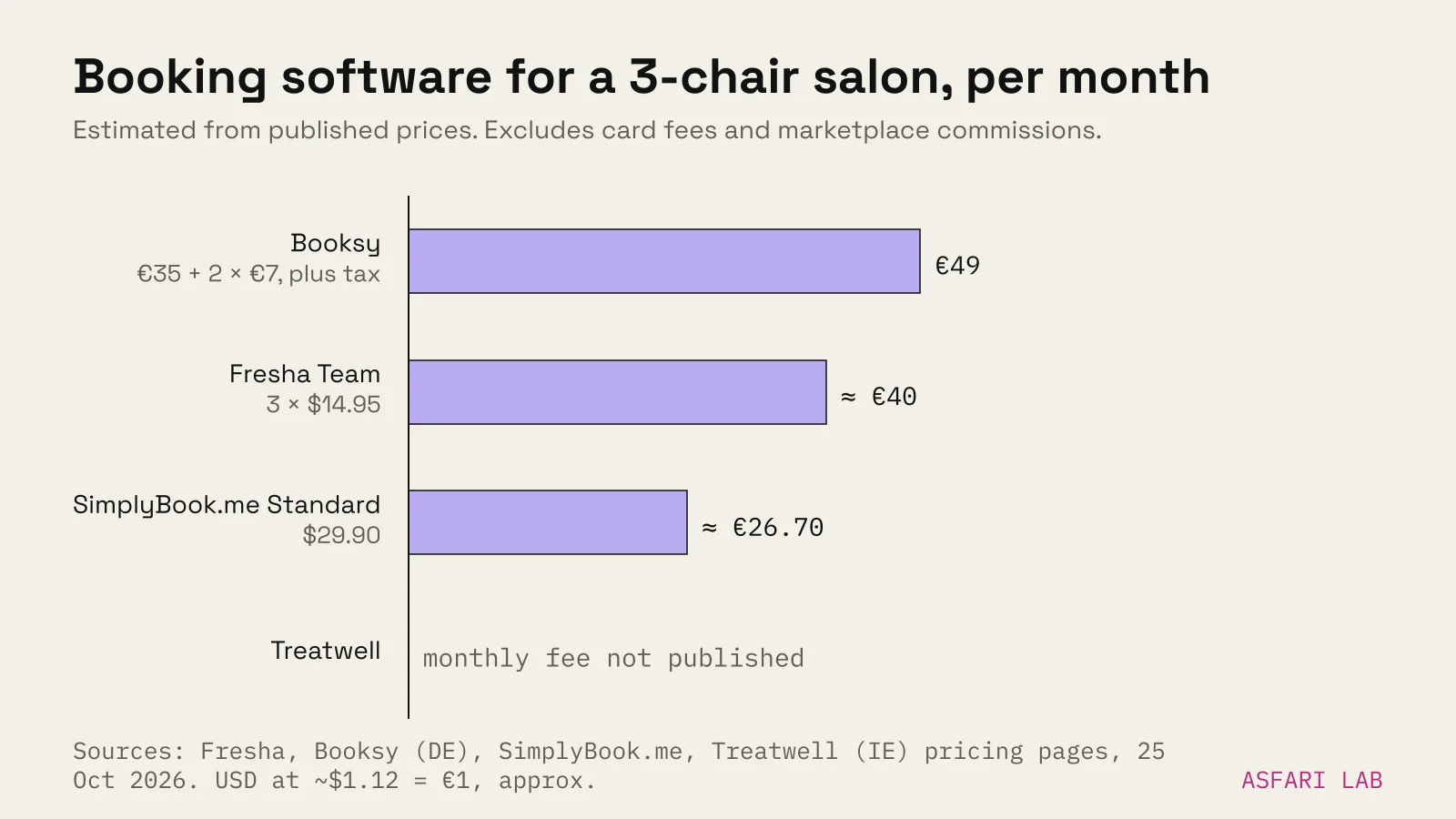
We checked the public pricing pages of four common systems on 25 October 2026. Prices change and vary by country, so treat this as a starting point.
| System | Published price | Fee on new clients from its marketplace | Card payments |
|---|---|---|---|
| Fresha | Independent: $19.95/month (≈ €17.80). Team: $14.95 per bookable team member/month (≈ €13.35) | 20% one-time commission, $6 minimum (≈ €5.35) | Online: 2.79% + $0.20 per transaction |
| Booksy (German pricing page) | €35/month, plus €7 per extra staff member, plus tax | Page states no commission on new clients | Not stated on the pricing page |
| Treatwell (Irish partner page) | Monthly fee not published on the page | 35% on the first booking from a new marketplace client, 0% on repeats | 2.5% + VAT on prepaid online bookings |
| SimplyBook.me | Free (50 bookings, 1 provider). Basic $13.90, Standard $29.90, Premium $59.90/month (≈ €12.40, €26.70, €53.50) | No marketplace commission listed | Payments from Basic plan up |
Fresha and SimplyBook.me publish prices in US dollars. The euro figures are approximate, converted at about $1.12 to €1 (late October 2026). Taxes are extra on all of them.
How to choose
- Solo stylist, few walk-ins: a free or low tier is enough. Check the booking cap before you commit.
- Team of three or more: per-staff pricing adds up. Do the sum for your headcount, not the headline price.
- You want new clients from an app: marketplace commissions are the real cost. A 20–35% cut on a first colour appointment is a lot. It can still be worth it if those clients come back.
- You mostly rebook regulars: pick on calendar quality, reminders and no-show deposits, not marketplace reach.
One more thing to check: whether the system's booking links work on your own site and Instagram without commission. Fresha and Treatwell both state direct bookings through your own links carry no marketplace fee.
Embed or link out?
Most systems offer two ways in: an embedded widget, or a button that opens their booking page.
A button is simpler and faster. The page stays light, and the booking flow is the one the provider keeps testing. An embedded widget keeps people on your domain but adds scripts and can feel cramped on a phone.
Our default for salons is a clear button per service and per stylist, opening the booking page with that service already chosen.
The price list: write it as text, not a picture
The price list is the most visited page on most salon sites. It is also the one most often uploaded as a photo of a printed menu or a PDF.
That breaks three things. Google can't read it well. Phones can't zoom it nicely. And you can't link a single treatment to booking.
Write prices as plain text:
- Group by service: cuts, colour, treatments, nails, brows and lashes.
- Show duration next to price. "Balayage, 3 h, from €140" answers two questions at once.
- Say what "from" depends on: hair length, stylist level, product.
- Put deposit and cancellation rules on the same page, in one short paragraph.
- Add a "Book this" link on every line.
Update prices in one place. If your booking system and your website show different prices, clients trust neither.
Portfolio photos that sell the work
Your work is the product. Photos do most of the selling.
- Same light, same background. Shoot by a window or one fixed lamp, against one wall. A consistent grid looks like a salon with standards.
- Sort by service. Someone booking blonde toning wants to see blonde toning, not a wedding updo.
- Back, side and front. Colour and cuts read better from more than one angle.
- Ask before you post. Clients are recognisable. Get their consent for website and social use, and keep a simple record of it.
- Compress before upload. Phone photos are often several megabytes each. Resize to the width the page shows and save as WebP or AVIF.
If you post every day on Instagram, don't embed the whole feed. Pick your best 12–20 images for the site and refresh them each season. A live feed widget is slow and shows whatever you posted last, good or not.
Reviews and your Google profile
Reviews decide salon bookings. BrightLocal's 2026 survey of 1,002 US consumers found 97% read reviews for local businesses. 74% said they only care about reviews from the last three months. 68% said they would only use a business rated four stars or higher.
That survey is American, but the habit is not. Two practical moves:
- Show recent reviews on the site. Pull a handful from Google or your booking system, with first names and dates. Link to the full list.
- Ask after every appointment. Check whether your booking system can send the request for you. Fresha, for one, sells a Google rating add-on. Our guide on how to get Google reviews covers the wording.
Your Google Business Profile is often seen before your website. Google's help page says you can connect a booking provider from the Bookings section of the profile, or add your own booking link instead. It also warns that a provider may charge for bookings made through Google, so check that first.
Google recommends at least three photos each of exterior, interior and work, in JPG or PNG between 10 KB and 5 MB. Google also lists relevance, distance and prominence as its local ranking factors, and reviews feed prominence. The full routine is in our local SEO checklist.
Website builder for a hair salon, or a designer?
Plenty of salons start with a website builder or the free page their booking system provides. Fresha, for example, sells a "Smart Website" add-on at $15.95 a month (≈ €14.20). For a single chair that can be enough.
A designed site starts to pay off when:
- you have several stylists and want each to have a page and booking link;
- you sell treatments with long consultations, like colour correction or extensions;
- you want to rank for "[service] in [your area]" rather than only your salon's name;
- your brand looks premium in the chair and cheap on screen.
For a fuller comparison, read website builder vs web designer. For budgets, see how much a small business website costs.
What we build for salons
We build salon sites on our Websites & apps service. Our Launch package covers up to five pages, mobile-first, with technical SEO, calls to action, forms and tracking. That is the five-page salon site above.
We don't replace your booking system. We connect it properly: one button per service and stylist, prices that match, and booking tracked as a conversion so you can see which pages bring appointments.
The same approach is behind Pistache, a pâtisserie site we made in the lab: one clear line on what they sell, phone-first layout, one main button. See it at /examples/pistache/.