
Facebook ads not working? The ad itself is rarely the only problem. More often it is one of three things: Meta can't see your sales, the budget is too thin to learn, or the creative doesn't stop the scroll.
Start with tracking. If the Pixel and Conversions API are broken, Meta is optimising blind and every other fix is guesswork.
Below are the ten causes we check, in order. Each has a quick test and a fix.
First, which problem do you have?
"Not working" means different things. Find your symptom:
| Symptom | Likely causes (numbers below) |
|---|---|
| Facebook ads not running at all | 7 rejected, 8 budget too thin, payment or account issues |
| Spending, but few clicks | 4 weak creative, 5 offer too late, 9 fatigue |
| Clicks, but no sales | 3 tracking, 6 landing page, 10 wrong objective |
| Results dropped after a good start | 9 fatigue, 1 learning reset, 2 audience exhausted |
| "Instagram ads not working anymore" | 9 fatigue, 4 creative not made for reels/stories |
Why Facebook ads are not working: 10 reasons and fixes
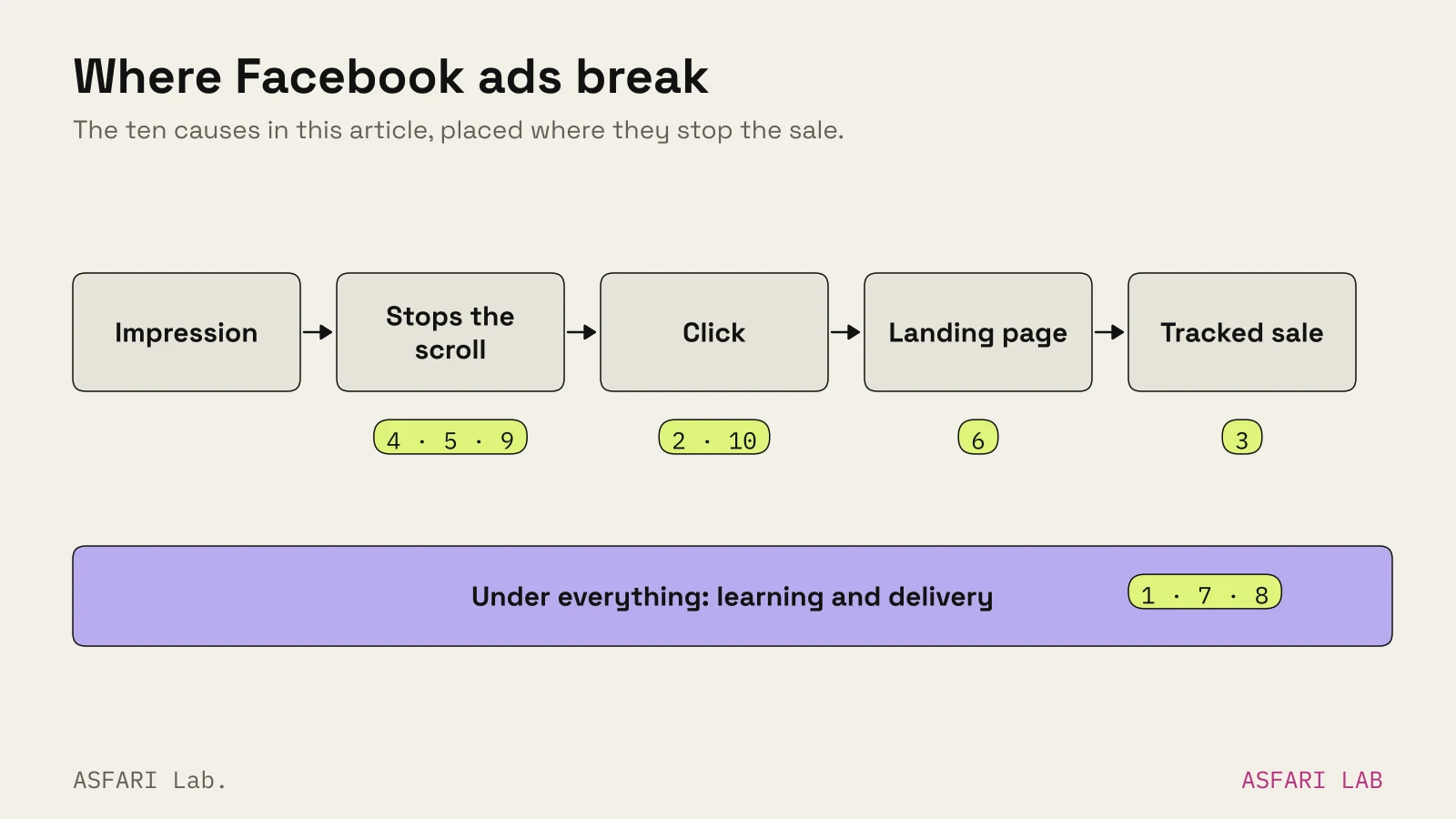
1. Stuck in the learning phase
Every new or significantly edited ad set enters a learning phase. Meta generally wants around 50 optimisation events within seven days to exit it, per PPC Land's summary of Meta's guidance. Until then, costs swing.
Significant edits restart learning: changes to targeting, placements, optimisation event or bid strategy, adding a new ad, big budget jumps, or pausing for over a week.
If an ad set can't reach the threshold, Ads Manager labels it "Learning limited".
Fix: Stop editing daily. Combine small ad sets into one. If you can't get 50 purchases a week, optimise for an earlier step, such as add to cart or lead.
2. Audience too narrow
Small businesses often stack interests, ages and postcodes until the audience is a few thousand people. The auction then has little room to find cheap impressions, and frequency climbs fast.
Meta's delivery has moved the other way. Since its Andromeda retrieval system, Meta has pushed advertisers towards broad audiences and varied creative, letting the ad itself find the right people. Jon Loomer's analysis of Meta's 2025 posts sums it up as a shift from niche targeting to creative diversity.
Fix: Widen to your country or city and a sensible age band. Let the creative do the targeting: an ad about cots finds parents without being told.
3. Tracking is broken: Pixel and Conversions API
This is a very common cause of "facebook ads not showing results". Ads Manager says zero purchases. Your shop says otherwise.
Meta recommends pairing the browser Pixel with the Conversions API, which sends events from your server. Meta says server events are processed like Pixel events and used for optimisation. Duplicate events must be deduplicated, or Meta counts sales twice.
Quick checks in Events Manager:
- Do purchase events arrive, with value and currency?
- Is the event match quality acceptable?
- Are browser and server events deduplicated?
- Did a cookie banner or theme update quietly remove the Pixel?
Fix: Repair tracking before touching anything else. Most shop platforms offer a Meta integration that can set up the Conversions API; check yours before paying for custom work.
4. Weak creative
Creative is the biggest lever you control. In Meta's auction, ads people engage with get a higher estimated action rate and better quality signals, so they win slots for less.
Signs of weak creative:
- Low three-second video views against impressions
- Click-through rate well under the category benchmark (LocaliQ's 2026 all-industry Facebook traffic average was 1.93%)
- The ad looks like a website banner, not a post
Fix: Make three to six genuinely different ads, not colour swaps of one. In the lab, our Pisipuu campaign for a kids' furniture brand followed two rules for every cut: win the first five seconds, and stay readable as a thumbnail.
5. The offer comes too late
Most people scroll past within a couple of seconds. If your video spends ten seconds on mood before saying what you sell and why now, most viewers never see the reason to click.
Fix: Put the product in frame immediately and the offer on screen by second three. That was the third rule we set for Pisipuu, and we use it on every short ad.
6. Landing page mismatch
The ad promises 20% off cots. The click lands on the home page, which shows sofas. People bounce, and Meta learns your clicks don't convert.
Fix: Send each ad to the page that matches its promise. Repeat the same headline, image and offer above the fold. Test it on a phone, since that is where feeds, stories and reels are seen.
If plenty of people arrive but few buy, the site is the problem. Our post on website traffic but no sales walks through it.
7. Ads rejected or stuck in review
If Facebook ads are not running at all, look at the ad status first. Meta reviews images, video, text, targeting and the landing page. Most ads clear review within about 24 hours, according to industry guides, though complex cases can take longer.
Common triggers: before/after claims in health and beauty, personal attributes ("Are you overweight?"), unclear landing pages, and too-good-to-be-true pricing.
Fix: Read the rejection reason, change the ad or page, and resubmit. If you believe the decision is wrong, appeal it from Ads Manager. Editing an ad during review restarts the clock.
8. Budget too thin
Meta's floor is about €5 a day for click or conversion goals (the exact minimum depends on your account currency and goal; Ads Manager shows yours). That runs an ad, but it rarely teaches Meta anything. Split €10 a day across five ad sets and each gets €2: none will ever leave learning.
Fix: Fewer ad sets, more budget in each. We set out test budgets in how much should a small business spend on ads? and real prices in Facebook and Instagram ad costs.
9. Creative fatigue
An ad that worked in its first fortnight slowly stops. Frequency rises, click-through falls, cost per result climbs. Meta may flag the ad as "Creative fatigue".
This is why Instagram ads seem to stop working: the same few hundred people have seen your reel five times.
Fix: Retire tired ads rather than tweaking them, and keep a pipeline of new concepts. Keeping that pipeline full is a core part of our Creative & campaigns work. Our post on ad creative fatigue covers how many versions you need at each spend level.
10. Wrong objective
Meta does what you ask, not what you mean. Choose "Traffic" and it finds people who click, many of whom never buy. Choose "Engagement" and you get likes.
| You want | Pick this objective | Optimise for |
|---|---|---|
| Online sales | Sales | Purchase (or add to cart while volume is low) |
| Enquiries | Leads | Lead form or website lead |
| People to know you exist | Awareness | Reach |
| Video views to retarget later | Engagement | ThruPlay |
Fix: Match the objective to the business result, and make sure that event is tracked (see cause 3).
A quick order of checks
- Is the ad actually running? Check status, review and payment.
- Is tracking firing correctly in Events Manager?
- Is the objective right for the goal?
- Is the budget enough for one ad set to exit learning?
- Is the creative made for each placement? See Meta ad sizes and creative rules.
- Does the offer show by second three?
- Does the landing page match the ad?
- Is frequency climbing? Refresh creative.