A portfolio website for architects should do one thing well: make the right client think "they've solved a problem like mine" and then make it easy to ask.
That comes down to project pages, not the home page. Each project needs a short story, a few great images that load fast, and a clear next step.
Most studio sites get the images right and the rest wrong. Huge, slow photo galleries. No text explaining the brief. A contact page with just an email address. This guide fixes all three.
What a portfolio website for architects must answer
Clients hiring an architect or interior designer are about to spend a lot. They read carefully. They are looking for evidence on four questions:
- Have you done this type of project? Residential, hospitality, workplace, retail, heritage.
- At this scale and budget? A kitchen refit and a 40-unit block need different studios.
- How do you work? Process, timeline, who they'll deal with.
- What do you cost, roughly? Fee basis, minimum project size, or at least who you're not for.
The best website for architects answers all four without a call. It is organised around project types, not a single scrolling grid.
A useful page set for a small studio:
- Home: one line on what you design and where, three featured projects, one "Start a project" button.
- Projects: filterable by type and location.
- Project pages: one per project, structured as a case study (below).
- Studio: people, approach, awards and press if you have them.
- Process: stages, typical timelines, how fees work.
- Contact: an enquiry form that qualifies leads.
An interior design company often adds a Services page, because clients buy "full design", "styling" or "sourcing" as separate things.
Project pages that sell: a case-study structure
A project page is a sales page. The images make people stop. The words make them enquire.
Use the same structure on every project, so visitors learn where to look:
| Section | What goes in it | Length |
|---|---|---|
| Hero | One strong exterior or room image, project name, location, year | 1 image, 1 line |
| Facts | Type, size (m²), stage, budget band if you can share it, collaborators | 5–7 short rows |
| The brief | What the client needed and what made it hard | 2–4 sentences |
| The response | The key design moves, each tied to a picture | 3–5 short blocks |
| Details | Materials, joinery, light, plan drawings | 4–8 images |
| Result | What changed for the client, in plain facts | 2–3 sentences |
| Next step | "Planning something similar? Tell us about it." + button | 1 line |
Two rules make this work.
Write the brief and the constraint. "A narrow north-facing terrace with no garden access" tells a future client far more than "a calm family home". Constraints show skill.
Show plans and sections. Many clients can't read them, but they signal rigour. One clean plan per project is enough.
Never invent outcomes. If you don't have numbers, say what changed in words: more light, a second bathroom, a layout that works for three children.
Image weight and performance
Architects' sites are image-heavy by nature. That is fine, as long as the images are handled properly.
For context, the HTTP Archive Web Almanac 2025 measured the median mobile home page at about 2.56 MB, of which about 0.9 MB was images. Portfolio sites often ship far more than that on a single project page.
Google's Core Web Vitals set the targets. Largest Contentful Paint, usually your hero image, should happen within 2.5 seconds. Layout shift should stay at 0.1 or less. Both are measured at the 75th percentile of real visits.
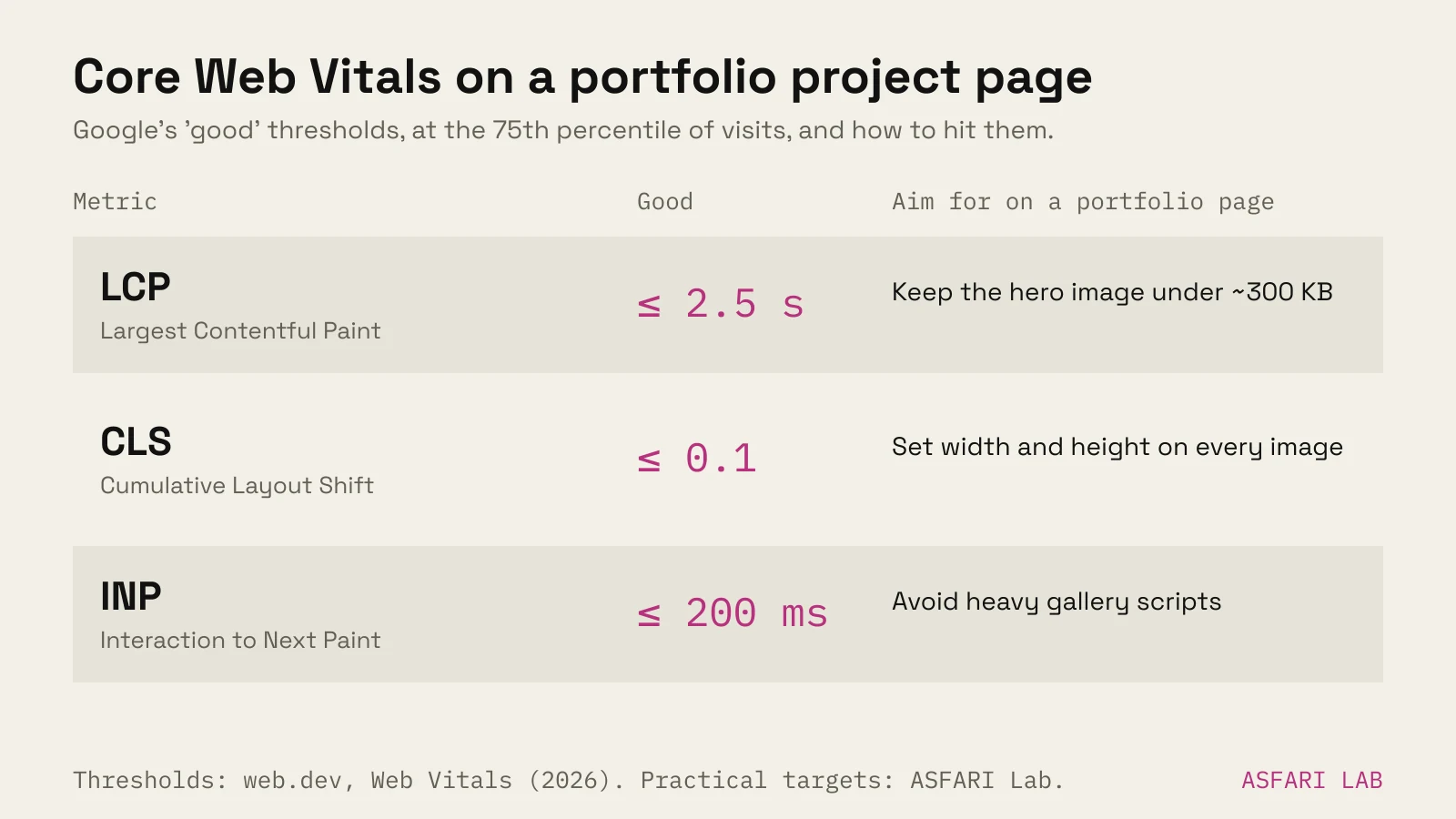
What that means in practice:
- Use modern formats. web.dev recommends AVIF or WebP with a JPEG fallback. They are usually much smaller at the same quality.
- Serve the size that's shown. A 6,000-pixel render squeezed into a 1,200-pixel slot wastes most of its bytes. Generate several sizes and let the browser pick.
- Lazy-load below the fold, never the hero. Native
loading="lazy"works in all major browsers. Don't apply it to the first image, or it will load late. - Set width and height. Without them the page jumps as images arrive, which hurts CLS and feels cheap.
- Be careful with full-screen video. It can look superb, but it is the heaviest thing on the page. Our post on website background video covers how to do it without a slow start.
Smooth motion and transitions suit architecture, too. Done well, they don't have to slow the site. See do animations slow down websites?
Website design for architects: the details that signal quality
Your site is a sample of your judgement. Clients notice:
- Typography with restraint. One or two typefaces, generous spacing, nothing decorative.
- Real captions. "Living room, oak floor, lime plaster walls" helps visitors and search engines. It also gives you alt text for screen readers.
- Consistent image ratios. Mixing portrait and landscape at random looks like a camera roll.
- Quiet navigation. Projects, Studio, Process, Contact. Nothing hidden behind clever labels.
- A text answer to "where". List the cities or regions you work in. Clients search for "architect in [city]" far more than for a studio name.
If your studio works at the premium end, many of the same rules apply as for luxury brands. We wrote them up in luxury brand website design.
An enquiry form that qualifies the lead
"Email us" invites vague messages. A short form gets you what you need for a first reply.
Ask five or six things, no more:
- Project type (drop-down).
- Location.
- Rough size, or number of rooms.
- Budget band (ranges, with a "not sure yet" option).
- Ideal start date.
- A free-text box: "Tell us about the project."
Add an optional file upload for plans or photos. Say how fast you reply, and keep that promise.
Put a short version of this form, or a button to it, at the end of every project page. That's where interest peaks.
Before you hire anyone to build this, read our questions to ask a web designer. For budgets, see how much a small business website costs.
Proof from the lab: towers and a resort
We made two property sites in the lab that use these ideas. Neither is a client project. Both show the approach.
Harbourskye, a residential towers site. The apartment picker is the building itself. You see the towers, and apartments light up as windows. The site also covers views and the build timeline. The idea is to turn a spreadsheet of units into something a buyer grasps at a glance. How this kind of picker works, and what it costs, is in our post on the interactive apartment selector.
Larch Resort, a resort site. An editorial layout with large photography and a booking bar built in. The lesson for interior designers is the same: let the rooms carry the page, and keep the action one tap away.
For developer-scale projects, read real estate development website.
Website builder or designed site?
A builder template can carry a new practice for a while. Choose one with a proper project-page layout, not just a gallery, and good image handling.
A designed site pays off once you want to rank for project types in your area, show plans and case studies properly, or present 3D or interactive work. The trade-offs are in website builder vs web designer.