The ad creative examples that work on Meta in 2026 mostly follow six patterns: problem first, product demo, before and after, creator-style, offer-led and carousel.
None of them is new. What changes results is how each is cut for the placement: a reel needs a different first second from a feed post or a YouTube pre-roll.
Below, each pattern with when to use it, and how we applied the rules to Pisipuu, a campaign we made in the lab for a kids' furniture brand.
Six creative patterns that keep working
We describe patterns rather than copy other brands' ads. To see live examples in your own category, use the Meta Ad Library (more on that below).
1. Problem first
Open on the frustration your customer knows. Then show the product solving it.
- Works for: practical products, services, anything that fixes an annoyance.
- First second: the problem, shown, not said. A wobbly shelf. A cluttered floor.
- Watch out: don't dwell. Get to the fix by second three.
2. Product demo
Show the thing doing what it does. Close, clear, fast.
- Works for: products with a visible mechanism or a clever detail: a fold, a click, a texture.
- First second: the most interesting moment of the demo, not the start of it.
- Watch out: demos drift. Cut every frame that doesn't show something new.
3. Before and after
Two states, side by side or in sequence.
- Works for: rooms, gardens, cleaning, organising, renovation.
- Watch out: Meta's advertising standards limit some before/after imagery, especially around health and body image. Check the policy for your category, and never fake the "before".
4. Creator-style, made honestly
Handheld, natural light, spoken to camera or shot point-of-view. It looks like a post, not an ad.
- Works for: products where trust matters and the look of "made by a person" lowers guard.
- Watch out: don't invent customers. A real founder, a real staff member or a real customer with permission is fine. A fake testimonial or an AI person posing as a buyer is not: it misleads the people you want to trust you. Our post on the EU AI Act and AI-generated ads covers labelling.
5. Offer-led
The deal is the hook: price, discount, free delivery, a deadline.
- Works for: retargeting people who already know you, seasonal sales, launches.
- First second: the product with the offer on screen.
- Watch out: offer-only ads tire fastest. Rotate them.
6. Carousel
Two to ten cards people swipe through. Each card can be a product, a step or a reason.
- Works for: ranges, how-to sequences, "five ways to use".
- Watch out: the first card does all the work. If it doesn't earn a swipe, nobody sees card two.
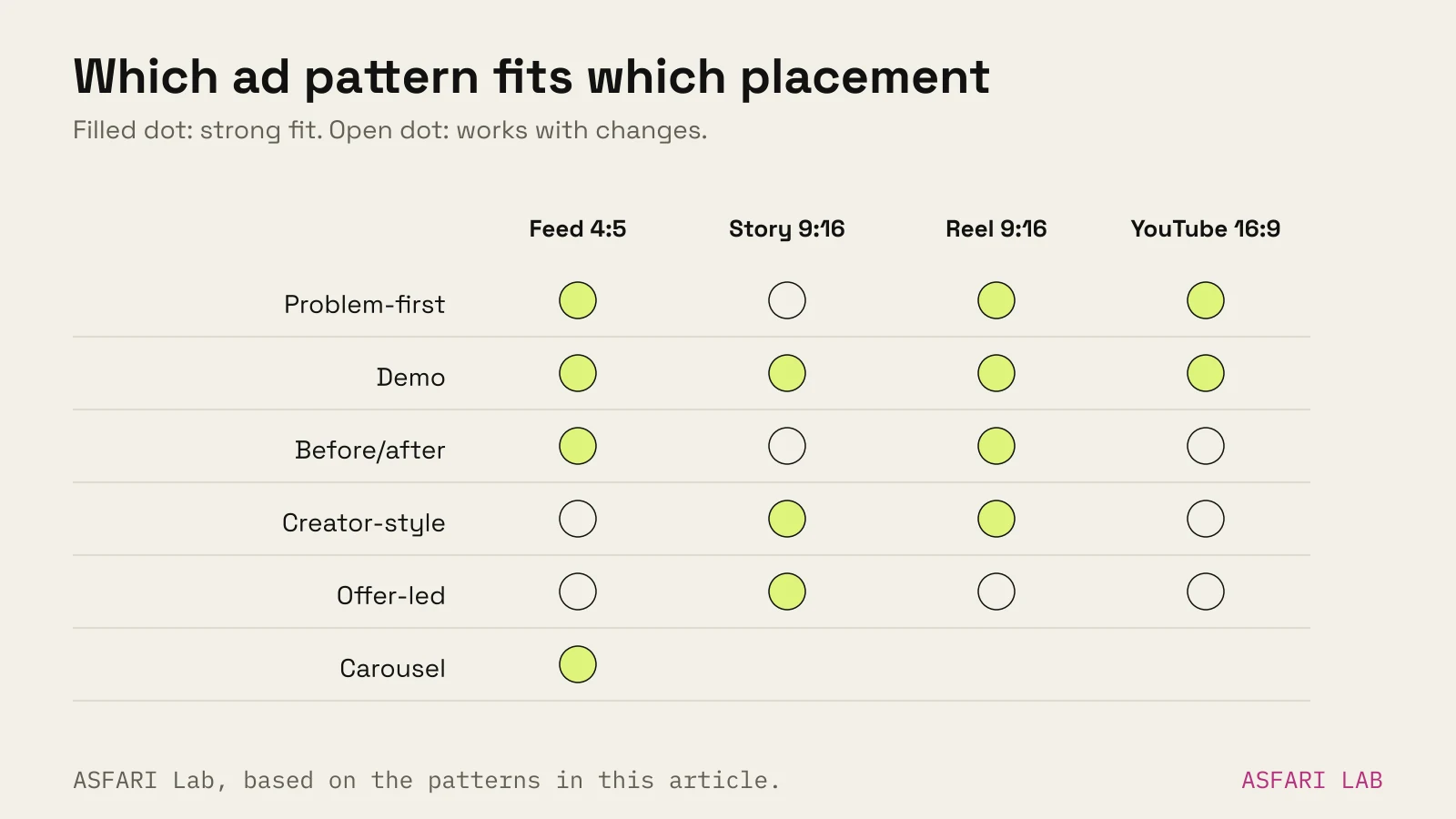
Facebook ad creative examples, by placement: the Pisipuu campaign
Pisipuu is a campaign we made in the lab for a kids' furniture brand. It shows how one idea becomes four ads. We set three rules before we started:
- Win the first five seconds.
- Readable as a thumbnail.
- Offer by second three.
| Placement | Format | What changes |
|---|---|---|
| YouTube in-stream | 16:9, 1920 × 1080 | Product in frame before the skip button appears; brand and offer early |
| Feed | 4:5, 1080 × 1350 | A single strong frame that reads at thumbnail size; offer in the headline area |
| Story | 9:16, 1080 × 1920 | Composed vertical from the start; text kept inside the safe zone |
| Reel | 9:16, 1080 × 1920 | Faster cuts, motion in the first second, on-screen words for sound off |
The specs for each are in Meta ad sizes and creative rules.
What we learned making it
- One idea, four edits. The concept stayed the same. The pacing, framing and first frame changed for each placement.
- Thumbnail test first. We judged every key frame at stamp size before animating.
- Words on screen. Every cut carried its message in large captions inside the safe zone.
This is the same process we use in Creative & campaigns: one idea, planned per placement before production starts.
We are not quoting performance figures for Pisipuu. It was made in the lab to show the method, not run as a paid campaign.
Meta ad creative examples: use the Ad Library for research
The Meta Ad Library is free. Meta added all active ads from every Page to it in 2019, so you can search any brand and see what it is running across Facebook and Instagram.
How we use it:
- Search three competitors and three brands you admire in other categories.
- Note which ads have been running longest. A brand rarely keeps paying for an ad that doesn't work.
- Write down the pattern, not the ad: "problem first, product in second one, offer card at end".
- Look at placements. Are they making true 9:16, or cropping feed posts?
Then make your own. Copying another brand's ad is lazy, and it can breach their copyright.
Ad creative AI: where it helps
AI tools now generate images, video and copy for ads, quickly and cheaply.
Where AI helps:
- Variations. New backgrounds, aspect ratios and colourways from one master asset.
- Concept sketches before a shoot.
- Copy options to test against each other.
- Product visuals from 3D or a single photo. See AI product video from an image.
Where it hurts:
- Fake people presented as real customers.
- Generic, look-alike visuals that blend into every other ad.
- Small factual errors on products: wrong handles, extra legs.
Our rule: AI for speed and variation, a human for the idea and the final check. We also label AI content where the law or the platform asks.
A one-page brief for any pattern
Whichever pattern you pick, write these six lines before anyone opens an editor. It keeps the ad focused and makes each placement cut easier.
- Who is scrolling? One sentence. "Parents of toddlers furnishing a small flat."
- What stops them? The first frame, described. "A tiny chair being carried with one finger."
- What do they learn? One benefit. "Light enough for a two-year-old to move."
- What is the offer? And the second it appears. "Free delivery in Estonia, on screen at 0:02."
- What do they do next? The button and the landing page it opens.
- Which placements? List them, so the 9:16 and 4:5 are planned from the start.
If you can't fill a line, the ad isn't ready. A clear brief also makes it easier to work with a studio or freelancer; our guide on how to brief a creative agency goes further.
How many of these should you run?
Variety matters more under Meta's current delivery system. Jon Loomer's reading of Meta's 2025 posts is that Meta now prefers genuinely different concepts over small tweaks.
A practical start: three patterns, each in feed and vertical. That is six ads. Our ad creative fatigue post sizes this by spend level, and how much to spend on ads helps set the budget behind them.
If the ads go live and stall, run through why Facebook ads stop working.