A small business brand guide needs 10–15 pages, not 60. It should tell anyone who touches your brand how to use the logo, which colours and fonts to use, what your photos look like and how you sound.
That is the whole job. If a printer, a freelancer or a new employee can produce something on-brand without calling you, the guide works.
Below is a brand guidelines template you can follow page by page, with what goes in each section, what to leave out, and a few public brand guidelines examples worth studying.
Why a short guide beats a long one
Big companies publish manuals with hundreds of rules. A café or a studio does not need that. It needs answers to the questions suppliers actually ask:
- Which logo file do I use here?
- What is the exact colour?
- Which font, and where do I get it?
- Can I put the logo on this photo?
A 10–15 page guide answers all of these. Anything longer tends not to get read. Anything shorter tends to leave out the colour codes, which is the question printers ask first.
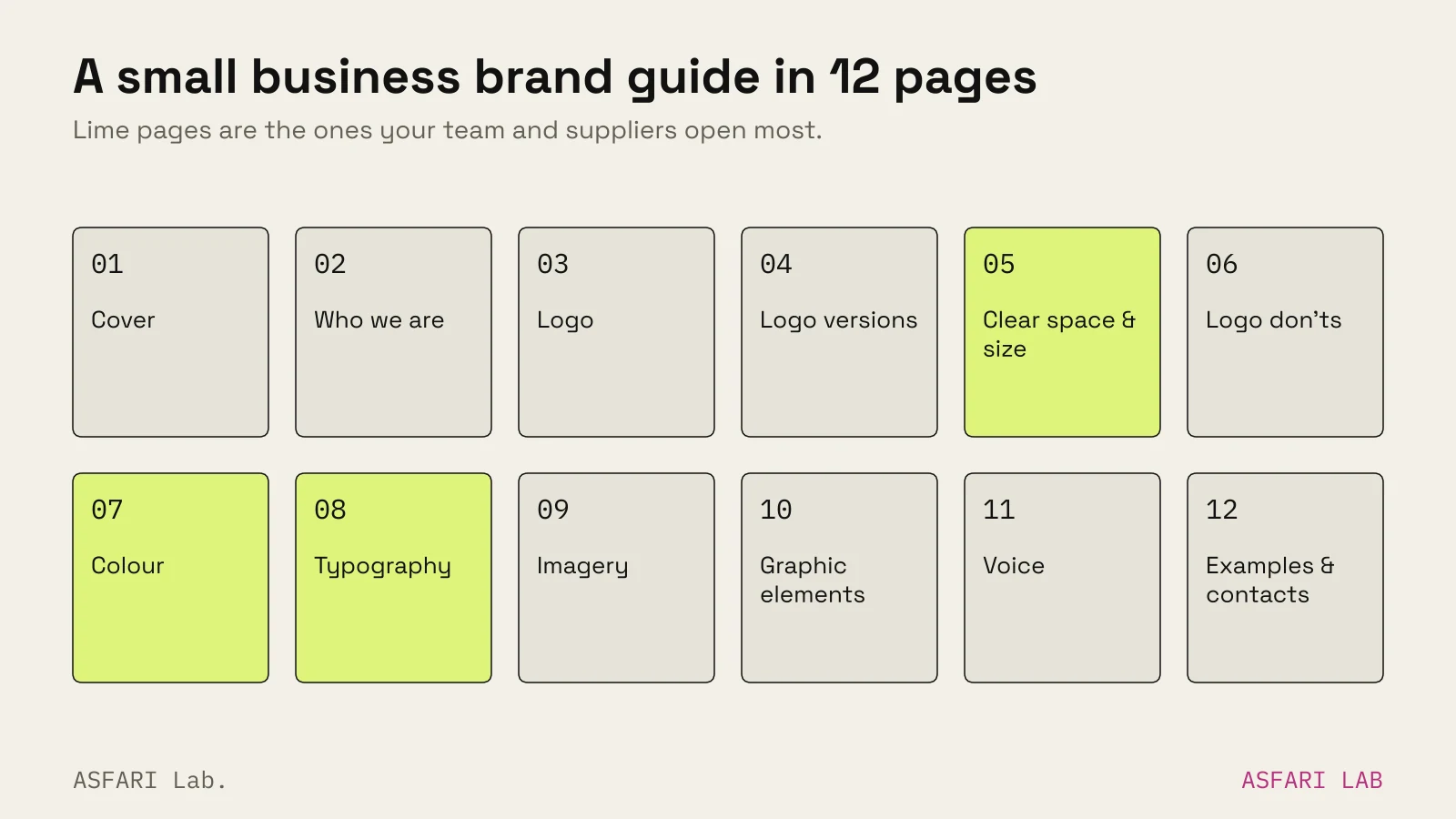
The brand guidelines template, section by section
1. Cover and contents (1 page)
Your logo, the guide's version number and a date. Keep a version number. When you update a colour, everyone can see which file is current.
2. Who we are (1 page)
Three or four sentences. What you do, who for, and what should feel different about you. This gives every later rule a reason.
3. The logo (1 page)
The main logo, large, with one line on what it represents. If the mark has an idea behind it, write it down. People protect what they understand.
4. Logo versions (1 page)
Show every version and when to use it:
- main logo (horizontal or stacked);
- compact mark or icon, for avatars and favicons;
- full colour, one colour, black, and reversed (white on dark).
List the file names next to each one, so nobody has to guess.
5. Clear space and minimum size (1 page)
Clear space is the empty margin the logo needs around it. Define it with a part of the logo itself, such as the height of one letter, so it scales with the logo.
Minimum size is the smallest the logo can appear before it breaks. Give it in pixels for screen and millimetres for print.
Spotify's public design guidelines for developers are a good model. They set clear space at half the height of the icon, and list minimum sizes for digital and print separately.
6. Logo misuse (1 page)
Show six to eight "don'ts" as small crossed-out examples. Common ones:
- stretching or squashing;
- rotating;
- recolouring outside the palette;
- adding shadows or outlines;
- placing on busy or low-contrast photos;
- rebuilding it in another font.
7. Colour (1 page)
Each colour gets a swatch and four codes:
| Code | Used for |
|---|---|
| HEX | websites, social, digital tools |
| RGB | screens, video, presentations |
| CMYK | printed matter |
| Pantone (optional) | spot-colour printing, packaging |
Also say which colour leads and roughly how much of each to use. "Mostly white, one dark, one accent" is clearer than a palette of six equal swatches.
Check contrast between text and background colours. Text that is hard to read is an accessibility problem, not a style choice.
8. Typography (1 page)
Name a headline font and a text font. For each, show weights and sizes in use, and say where to get it and which licence covers you.
Add a free fallback (for example a system font) for email and documents where your fonts are not installed.
9. Imagery (1–2 pages)
Show four to six example photos that feel right, and two that do not. Describe the light, colour, framing and subjects in a few words each. If you use illustration or 3D, add a sample.
10. Graphic elements (1 page)
Patterns, shapes, icons, lines. Show how they combine with the logo and how they should not.
11. Voice (1–2 pages)
How you sound in writing. See the next section.
12. Examples and contacts (1–2 pages)
Real applications: a business card, a social post, a sign, a label. Then a contact line for questions and where the master files live.
That makes 12–15 pages. If you have packaging or signage, add a page for each.
Brand voice guidelines in two pages
Voice is the section most small businesses skip. It is also the one your team uses daily, in captions, emails and replies to reviews.
Keep it short:
- Three voice words, each with a "but not": warm, but not cute; direct, but not cold; expert, but not technical.
- Do and don't sentences. Rewrite one real caption both ways.
- Words we use and avoid. Product names, how you spell them, phrases you never say.
- Tone by situation. How you sound in a promo, a complaint reply and an apology.
Mailchimp's content style guide is the best-known public example of voice guidance. It covers voice and tone, grammar, writing for accessibility and more, and it is published under a Creative Commons non-commercial licence. Read it for structure. A small business needs about one-twentieth of its length.
Brand guidelines examples worth studying
You learn faster from real guides than from templates. Three public examples, described factually:
- NASA Graphics Standards Manual (1975). Created by the New York firm Danne & Blackburn for NASA's "worm" logo. It set out how the identity applied to everything from letterheads to vehicles. NASA retired the worm in 1992. The manual was reissued as a book in 2016 by Jesse Reed and Hamish Smyth.
- Spotify design guidelines. A public guide for partners using the Spotify logo. It covers clear space, minimum sizes, colour versions and a clear list of don'ts, such as rotating or stretching the logo.
- Mailchimp content style guide. A public writing and voice guide, used internally by the company and shared openly.
Look at how each one shows rules with pictures, not paragraphs. Do not copy their content; your rules should come from your own identity.
Brand guidelines template free vs designed
A free brand guidelines template (Canva, Figma community files, Google Slides) gives you the page structure. That is useful.
What a template cannot give you is the content: the clear space rule that fits your logo, the colour codes that actually print correctly, the photo examples that match your business. An empty template filled in with guesses becomes a guide nobody trusts.
If you already have a working logo and palette, a free template is a sensible start. If you are still deciding those, design the identity first and the guide follows. Typical costs for guides on their own are in Brand identity cost: what a package should include.
Brand guidelines PDF: format and upkeep
- Format. A PDF is still the most useful format, because anyone can open it. Keep an editable master (Figma, InDesign or Slides) and export from it.
- Where it lives. Put the PDF and the logo files in one shared folder. Link it from your email signature or your supplier brief.
- Upkeep. Review it once a year. Change the version number every time a colour, font or file changes.
For Kōhī, an identity we made in the lab for a coffee bar, the mini guide records one central idea: the mark is built from the macron line over the vowels. The guide then shows that line on the cup, cards, bag and social post, with the palette and type pairing. That one idea is easier to protect than twenty unconnected rules.
Every identity we make includes a mini brand guide as a PDF. See what else is in the package on the logo and brand identity service page. If you are deciding between a logo and a full identity, start with Logo or brand identity?.